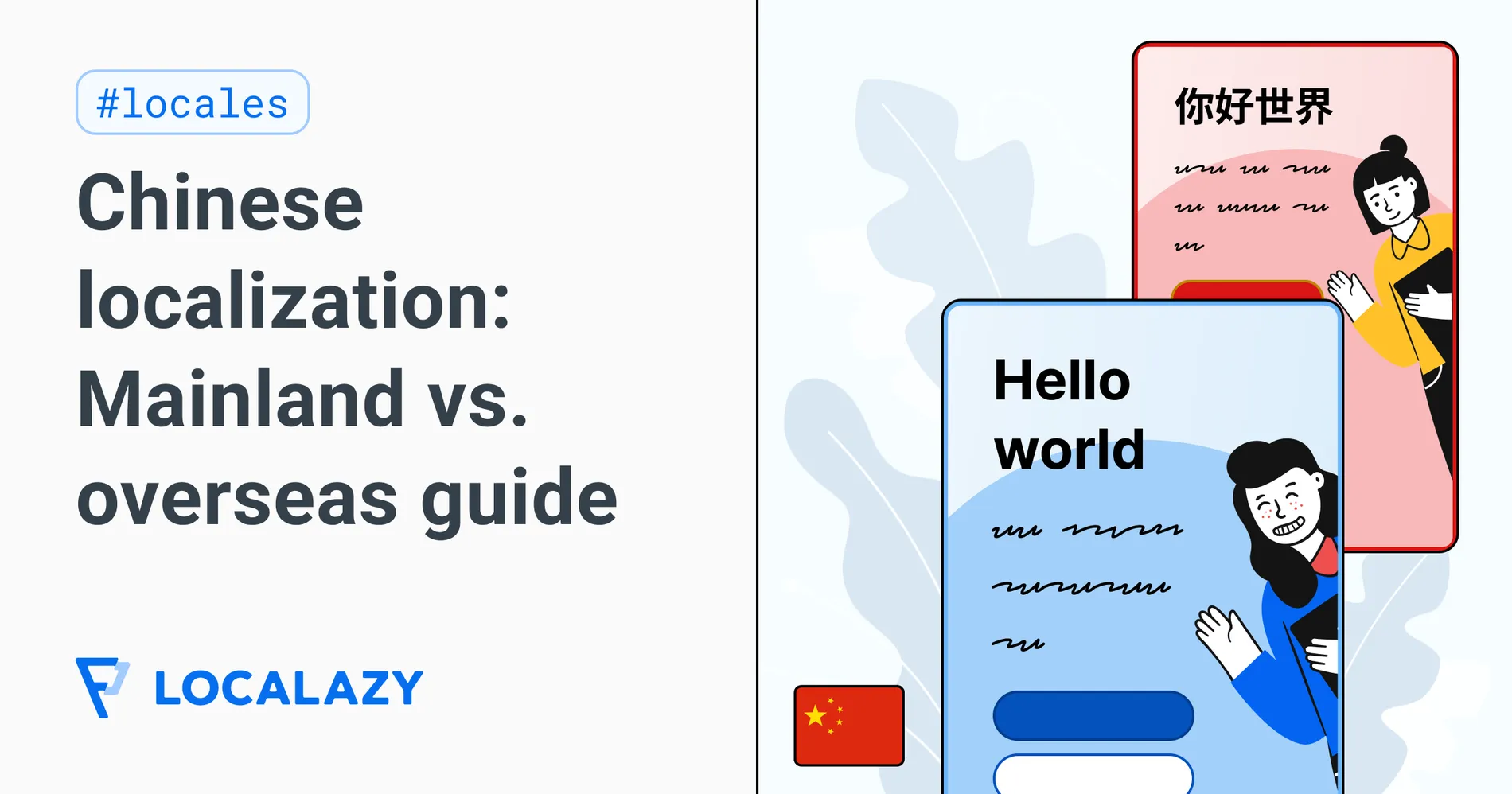
From time to time, I receive a message that goes more or less like this: “Hi Jenny, I’ve built an app. Can you translate it into Chinese?” The team usually hands it to me right before launch, assuming "Chinese" is just a single language to select from a dropdown menu.
I don’t always say yes. Whether a project is a good fit usually depends on a handful of questions first. “Into Chinese,” it turns out, includes at least three of them:
- 💬 Which market are you serving? Mainland China and the overseas Chinese communities aren’t the same audience. Their digital ecosystems and legal frameworks are entirely separate. And more often than not, combining them together poses a compliance hazard.
- 💬 Which script and regional variant do you need? Simplified covers Mainland China and Singapore; Traditional covers Taiwan, Hong Kong, Macau, and most of the diaspora. But vocabulary and register diverge wildly between these regions.
- 💬 And how will you handle ongoing updates? App translation is a continuous cycle. Without a solid framework early on, new releases will potentially introduce untranslated strings, out-of-context errors, and other unexpected challenges.
I checked the latest official figures before writing this. According to the 57th Statistical Report on China's Internet Development published by the CNNIC in early 2026, China has 1.125 billion internet users and an 80.1% penetration rate. Add the roughly 60 million Chinese speakers overseas across Southeast Asia, Australia, North America, and Europe.
These groups share a language family, but operate under different app store ecosystems, data regulations, and user expectations. There is no single translation file that will work for all of them. You have to figure out exactly who you are targeting early on. If you ignore these differences at the start, you'll end up having to rebuild parts of your app when it's already in users' hands.

🌏 Mainland vs. Overseas: Why to bypass China first
When teams tell me they want to launch in Chinese, they usually mean the mainland. It’s the obvious (default) choice, but it's rarely the best place to test the waters. Instead of tackling Mainland China immediately, you can target the tens of millions of Chinese speakers living overseas. These communities use the standard Google Play and Apple App Stores (platforms that your team likely already uses). Launching here generates user feedback and bypasses the mainland compliance paperwork.
Mainland China is, more often than not, the wrong place to start when you're launching your product in Chinese. Targeting overseas Chinese speakers first is a much more familiar and simple process
I took this approach with Elfie, a Singapore-headquartered health app I reviewed for both Simplified Chinese and Traditional Chinese (Hong Kong). The client made the call to serve Singapore and Hong Kong without a mainland launch, which completely changed the workflow and required distinct language around health data.
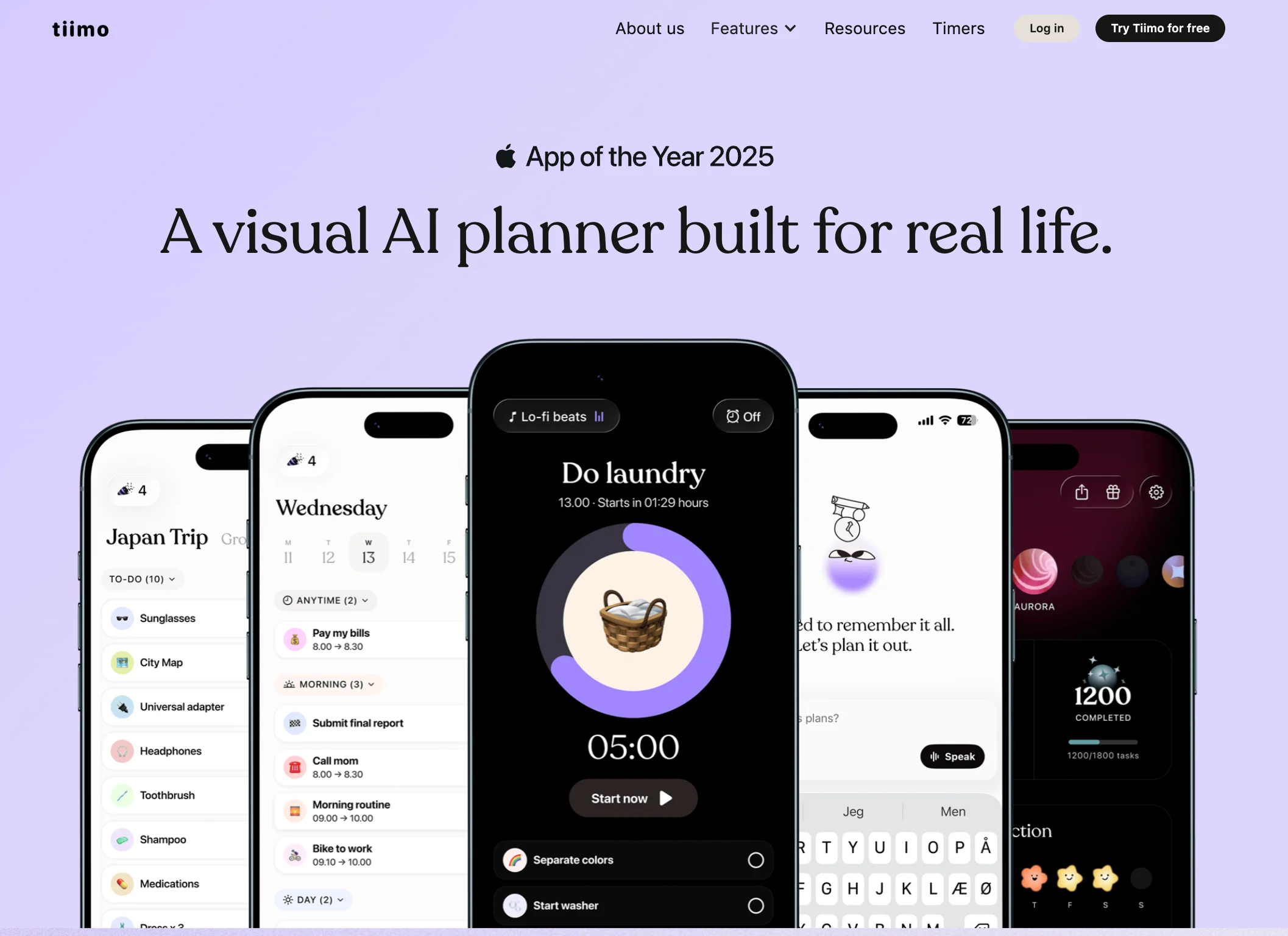
Tiimo took a similar path. It’s a Danish visual planning app built for people with ADHD or autism. The team launched Simplified Chinese on iOS first, aimed at overseas users, then expanded to Traditional Chinese for Taiwan. They proved the app worked overseas before taking on the mainland.
📋 Compliance checks before you launch in Mainland China
If you have decided Mainland China is your first destination, you need to understand the legal hurdles. I should be clear: I am a localization expert, not a lawyer. My projects mostly target overseas Chinese audiences because mainland tech regulations require constant legal monitoring to stay compliant.
Here are the specific regulatory hurdles that your foreign app will have to face:
- ICP Filing: Any website or app hosted in mainland China needs an ICP (Internet Content Provider) registration. Without a Mobile App Filing (mandatory since 2023), mainland Android stores and the iOS App Store will reject your app. You cannot just submit this yourself: you need a Chinese legal entity or a licensed local partner.
- PIPL and Cross-Border Data: China’s Personal Information Protection Law (PIPL) governs how data moves internationally. If your SaaS app sends sensitive user data (like syncing health records or payment histories) to a server in the US or Europe, you will face strict security assessments by the Cyberspace Administration of China. Both processes cost real time and money. For specific guidelines on how to actually get approved, you'll need consulting from specialized Chinese compliance partners.
- Country/region selectors: Regulators routinely fine companies or ban apps that violate China's laws regarding national sovereignty. Under strict mainland regulatory standards, such as the authoritative guidelines for terminology related to Hong Kong, Macau, and Taiwan (涉港澳台用语规范), these territories cannot be listed alongside sovereign nations. If your onboarding dropdown is simply labeled “Country” (国家) rather than “Country/Region” (国家/地区), or if you fail to format the list items correctly (for example, using 中国香港 for Hong Kong, China), mainland app stores will flag and reject your submission immediately. You'll need to check your UI carefully before you submit.
🀄 Simplified or Traditional?
Once you've picked a geographical target for your Chinese launch, your first question might be...
Yes, most educated Traditional readers can manage Simplified text with some adjustments. The reverse is less reliable. But just because they understand the words doesn't mean the translation will be successful.
Adapt to your users
If you serve a Simplified app to a user in Hong Kong or Taiwan and don't adapt it to the region, they will immediately know it wasn't made for them. The local vocabulary and tone are different enough that your app will just feel out of place. Take a simple comparison of common words in the SaaS industry:
This is where game localization and general app localization part ways. Games have largely settled on two variants (Simplified plus Taiwan Traditional), which makes sense for install-base economics. App and SaaS localization run on a different logic. You cannot just run Taiwanese text through a converter and expect it to work for Hong Kong.
List of regions, scripts & locale codes
Here is how Localazy maps the regions, scripts, and locale codes for Chinese localization:
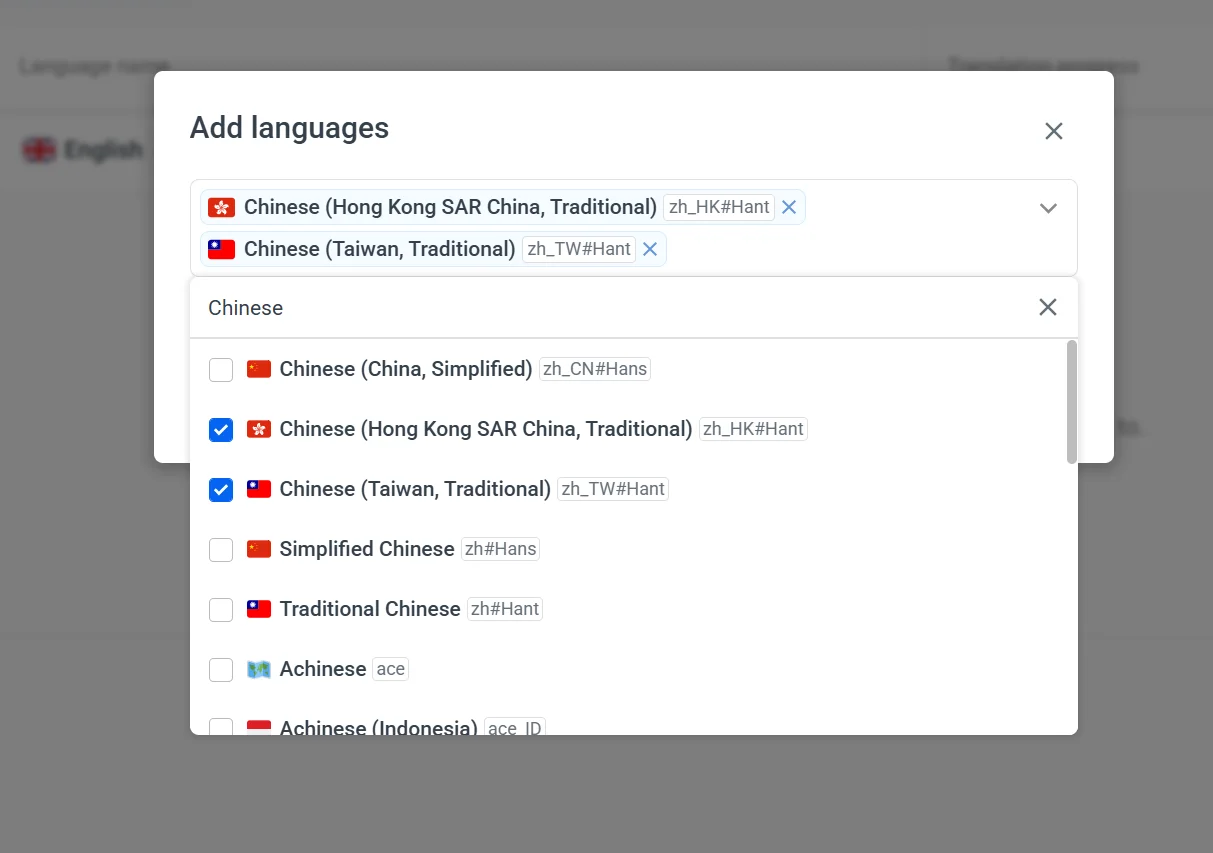
Older platforms used zh_CN for Simplified and zh_TW for Traditional. Localazy uses explicit script codes instead (#Hans and #Hant) and differentiates between zh_HK#Hant and zh_TW#Hant.
📲 Chinese App stores and ASO
If your team builds for iOS first, you might not worry about Android stores right away. But in Mainland China, Android is a completely different landscape.
Google Play is blocked, so people get their apps from many different places. Users download them either from stores pre-installed on their phones by the manufacturer, or from massive third-party platforms. The main ones to know:
- Tencent MyApp (应用宝): A third-party store that anyone can use no matter what phone brand they have. If you want to reach most people quickly, start here.
- Huawei AppGallery: One of the largest non-Google Android stores in the world. Essential if you’re targeting Huawei users, who make up a massive share of the mainland market.
- Xiaomi GetApps: Very popular, especially with users outside of the biggest major cities.
- OPPO Software Store & vivo App Store: Massive stores that come pre-installed on their respective devices.
Each store maintains its own distinct review pipeline. And for most, an approved ICP filing is a hard prerequisite. Without it, you cannot even submit the app.
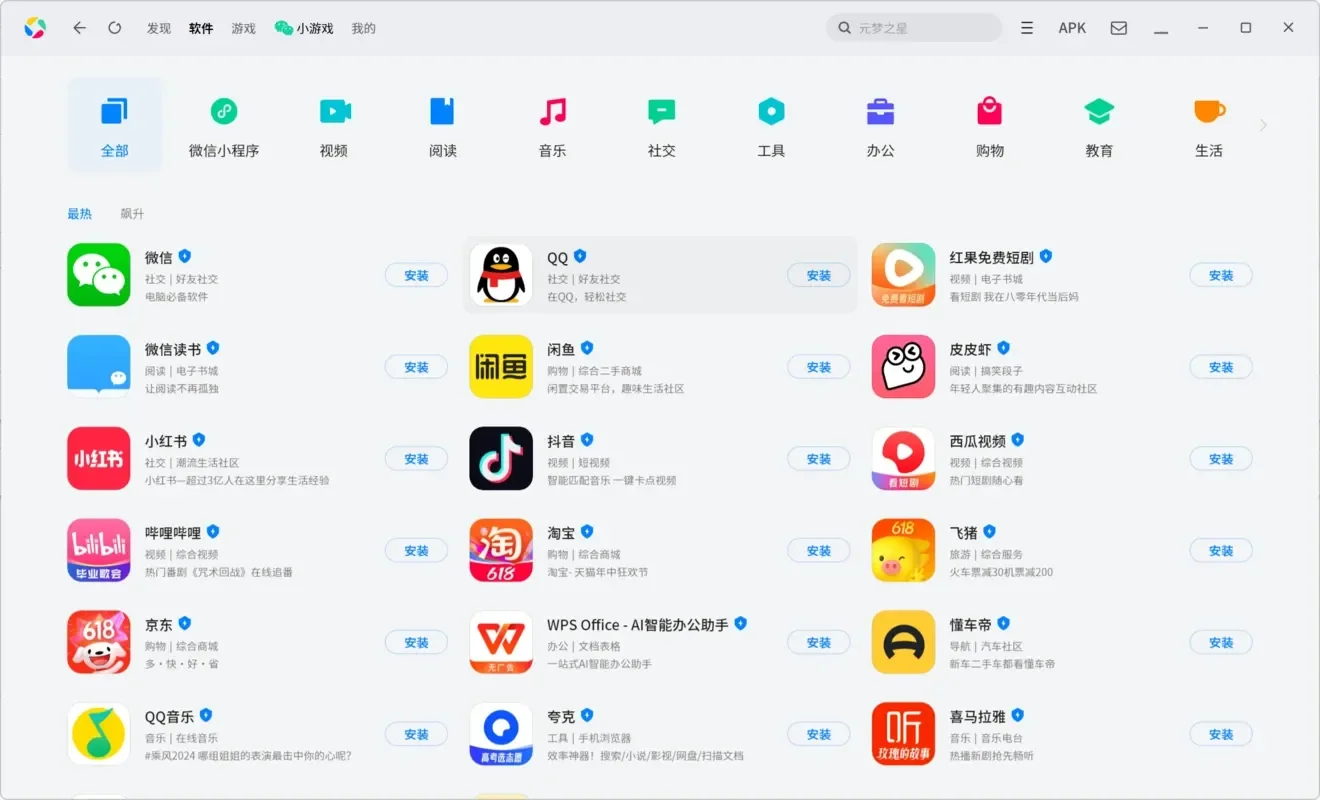
Then comes ASO (App Store Optimization). The way people search for and discover apps is completely different from the West. You can't just translate your Google Play screenshots and keywords. You need a native speaker to rewrite them specifically for these Chinese stores to have a chance at ranking well.
⚠️ 3 common Chinese localization mistakes
When you localize an app into Chinese, translation mistakes usually fall into three specific categories. You need to know how to spot them.
1. Factually wrong
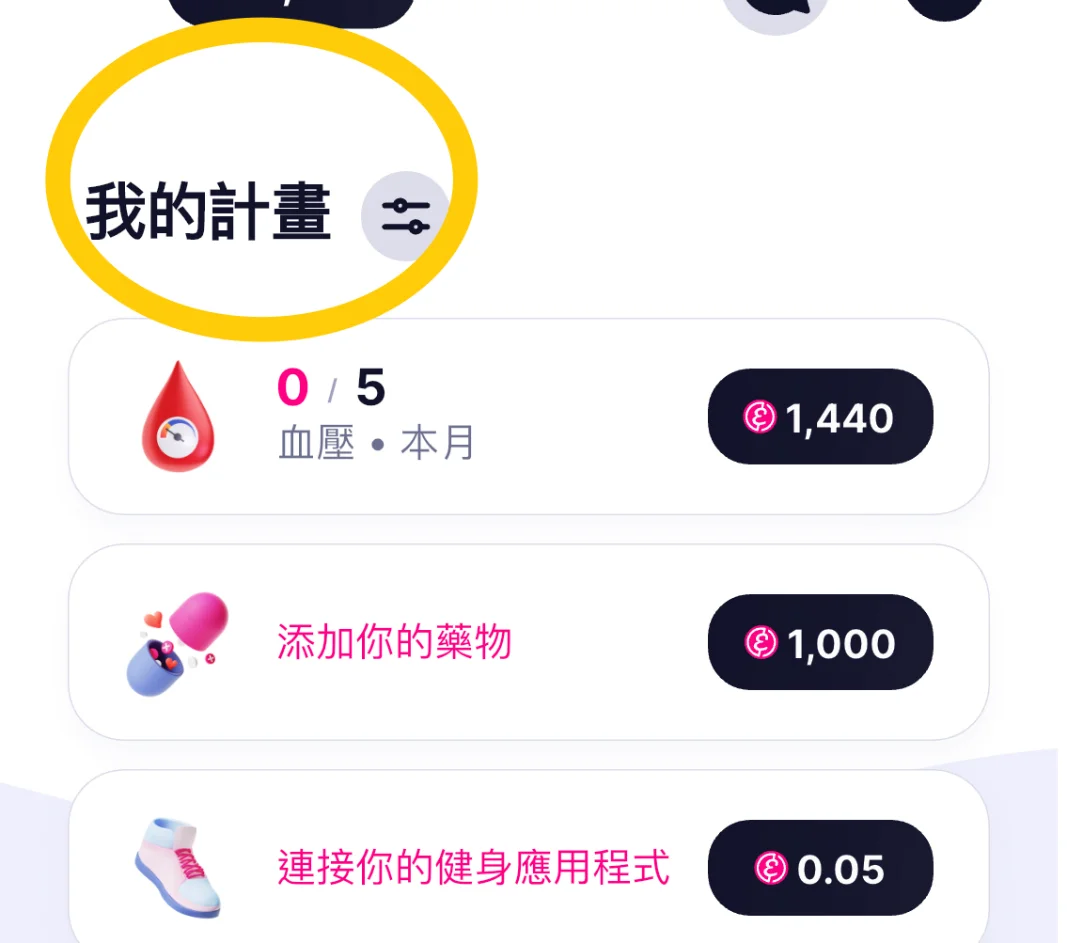
I was working through the Traditional Chinese strings for the Elfie Hong Kong build when one error kept turning up. It appeared on 48 strings: it was a matter of two characters. The word “Plan” had been translated as 計畫 instead of 計劃. Both characters are valid Traditional Chinese and are pronounced the same. Nothing was misspelled. But the first one is preferred in Taiwan, and the second is standard in Hong Kong and Macau. Since both were technically valid and pronounced the same, no automated QA tool flagged the mistake. But it would have been noticed by users if I didn't catch it in time
2. Contextually wrong
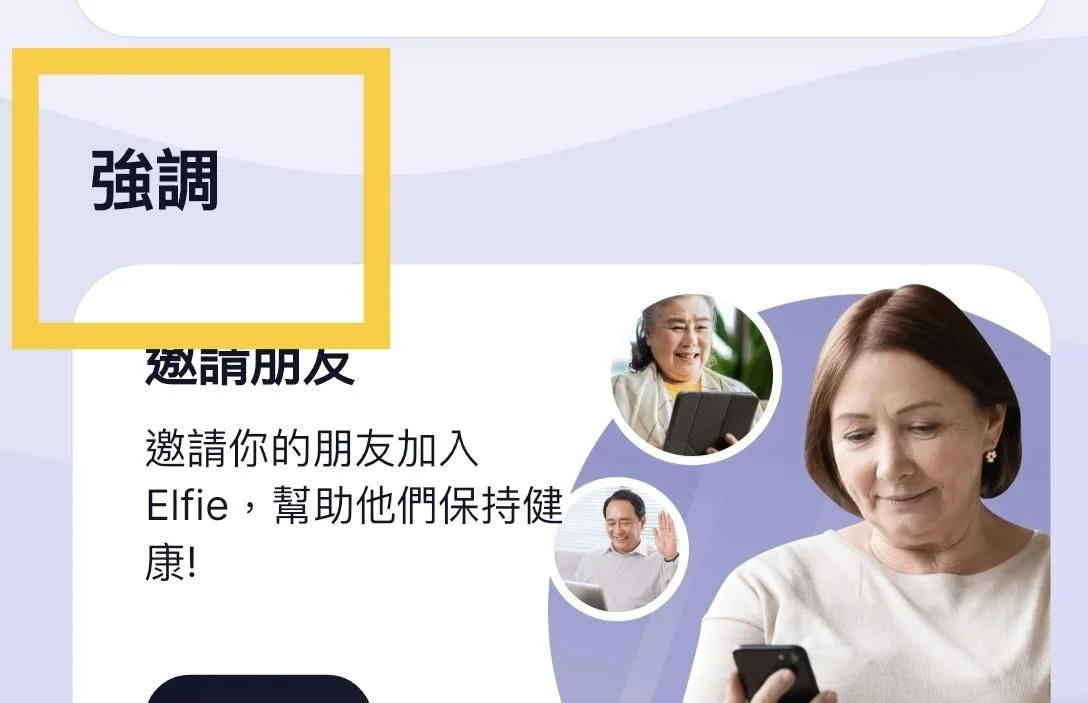
Two more strings came out of the same project. “Highlights” was translated as 強調 — grammatically correct, but it sounds like a command (“to emphasize”). The natural Hong Kong UI label should be 精選 (“featured; carefully selected”).
Another string, 你已經到了盡頭 for “You’ve reached the end”, back‑translates to “You have reached the end of the road” and is totally wrong for someone who’s merely scrolled to the bottom of a list. 已到頁面底部 (“You reached the bottom of the page”) was much more natural. Both translations looked fine at first but they'd fail instantly in the live app.
3. Tonally wrong
This example comes from my work on the Preply language learning platform. The English source was: “A tutor will be assigned to you.”
- ❌ Machine output: 导师将被分配给您 (Back-translation: "A tutor will be assigned to you.")
- ✅ Human revision: 我们将为你匹配一位导师 (Back-translation: "We’ll match you with a tutor.")
Both sentences are grammatically correct. But in Chinese linguistics, the passive voice is traditionally "adversative", meaning it is reserved for unfortunate events, punishments, or strict legal warnings. When AI or MT translates a friendly UI message using a passive structure, it subconsciously triggers a negative or bureaucratic tone.
🤖 Where AI can help, and where it fails
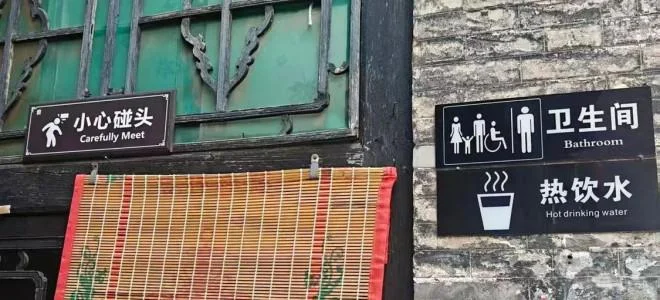
AI and MT mistakes happen everywhere. A December 2025 Xinhua investigation found dozens of unedited machine-translated signs at Chinese tourist sites. One sign meant to say “Watch your head” (小心碰头), but because the machine translated it literally, it read “Carefully Meet.”
To avoid these issues, you need to define the boundary between automated tools (MT and AI) and human review. That boundary depends on your content and your industry constraints:
- What AI handles well: Repetitive technical content, standard UI strings, and basic system messages. If speed matters more than nuance, AI can do the heavy lifting.
- Where AI still fails: Regulatory language and cultural context. A mistranslation in a health app's data warning, for instance, is a liability issue, and an LLM does not understand the legal weight of words. For user-facing marketing copy, AI produces text that is grammatically correct but culturally flat.
The most effective approach for SaaS localization is AI-assisted, human-verified. Here is how that breaks down in practice:
Stage 1: AI and MT for a standard UI
Standard UI labels (like "Save" or "Loading") and basic system messages generally have one correct answer with enough context. Running these through an AI or MT engine paired with tools like a translation memory, a glossary, and a style guide saves time and enforces consistency across the entire app.
Stage 2: Human editorial judgment
While AI and MT can be enough by themselves in certain contexts, a human editor is usually needed to ensure quality. In the case of Chinese, a human editor can drop English structures that have been mirrored from the source and make them sound native, like this sentence from the Preply app:
- Source: “Keeping your availability flexible helps retain students and makes it easier for them to book more lessons with you.”
- Machine output: 让你的时间保持灵活,可以帮你留住学生,并让他们更容易和你预约更多课程 (Back-translation: “Keeping your time flexible can help you retain students and make it easier for them to book more lessons with you.”)
- Human revision: 时间灵活一点,学生更愿意继续上课,也更方便预约 (Back-translation: “A bit more flexible with your time, students are more willing to keep taking lessons, and booking is easier too.”)
📚 Related read: Your AI pre-translation quality is only as good as your source prep
Stage 3: Transcreation for marketing and trust
I've learned over the years that general translation simply transfers words from one language to another. A standard "Cancel" button or basic UI string is fine for a machine. But AI cannot navigate cultural layers. It misses the unwritten rules of communication that actually build trust with local users. In most cases, what SaaS companies need for both marketing campaigns and brand-heavy UX copy (like onboarding screens or CRM) is transcreation: transferring a brand and its underlying message from one culture to another.

For instance, if your app texts rely on humor, wordplay, or a specific brand voice to persuade users, standard translation will strip that away. A human reviewer’s job is to recreate the emotional impact of the original text, which is something automated translation cannot do on its own.
⚙️ Managing your Chinese localization in Localazy
A localization platform should make technical mapping handling easy so you can focus on the translations that actually need a human. Next is a quick summary of how Localazy can help you achieve that (and more).
Explicit script codes
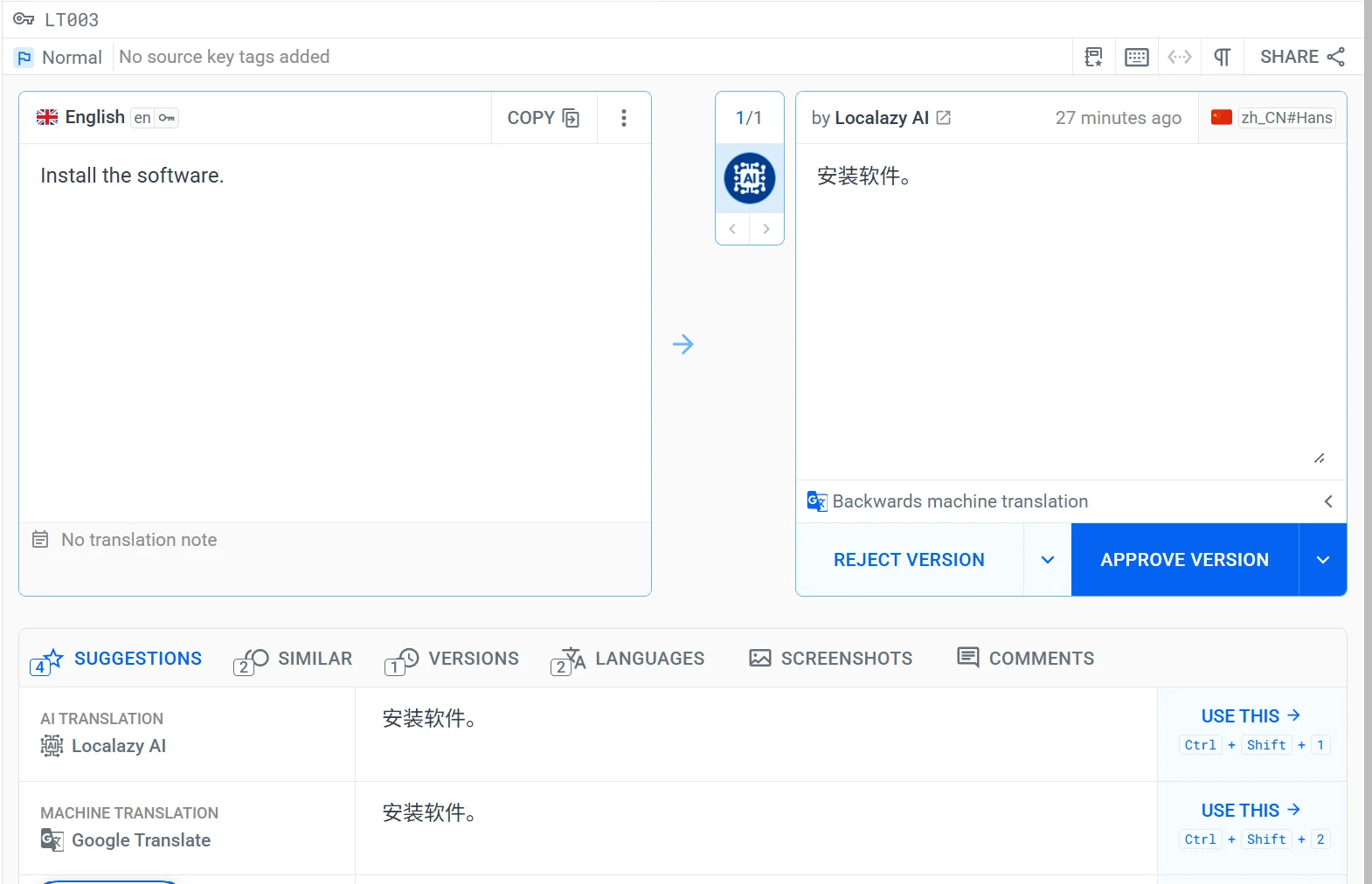
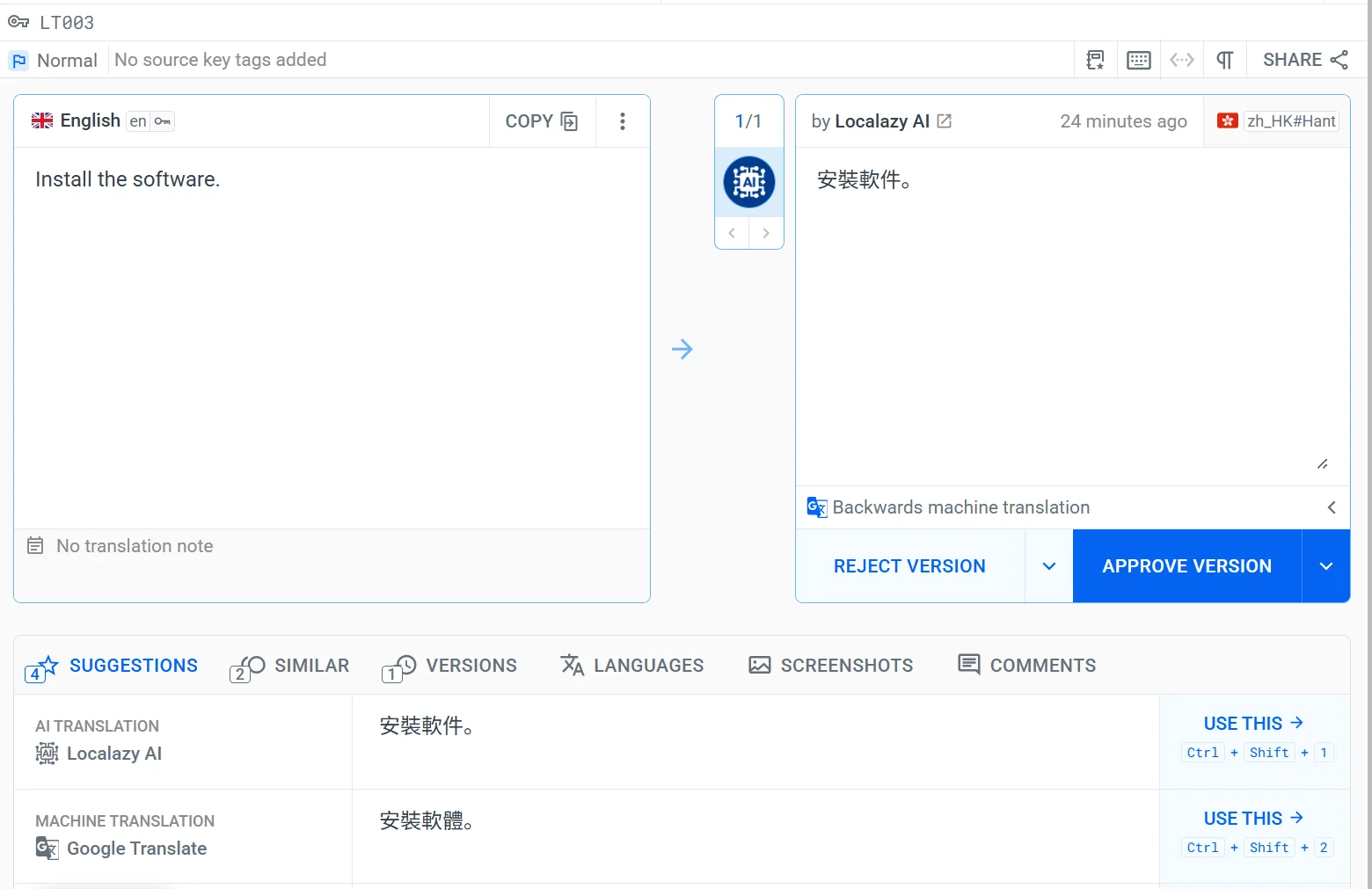
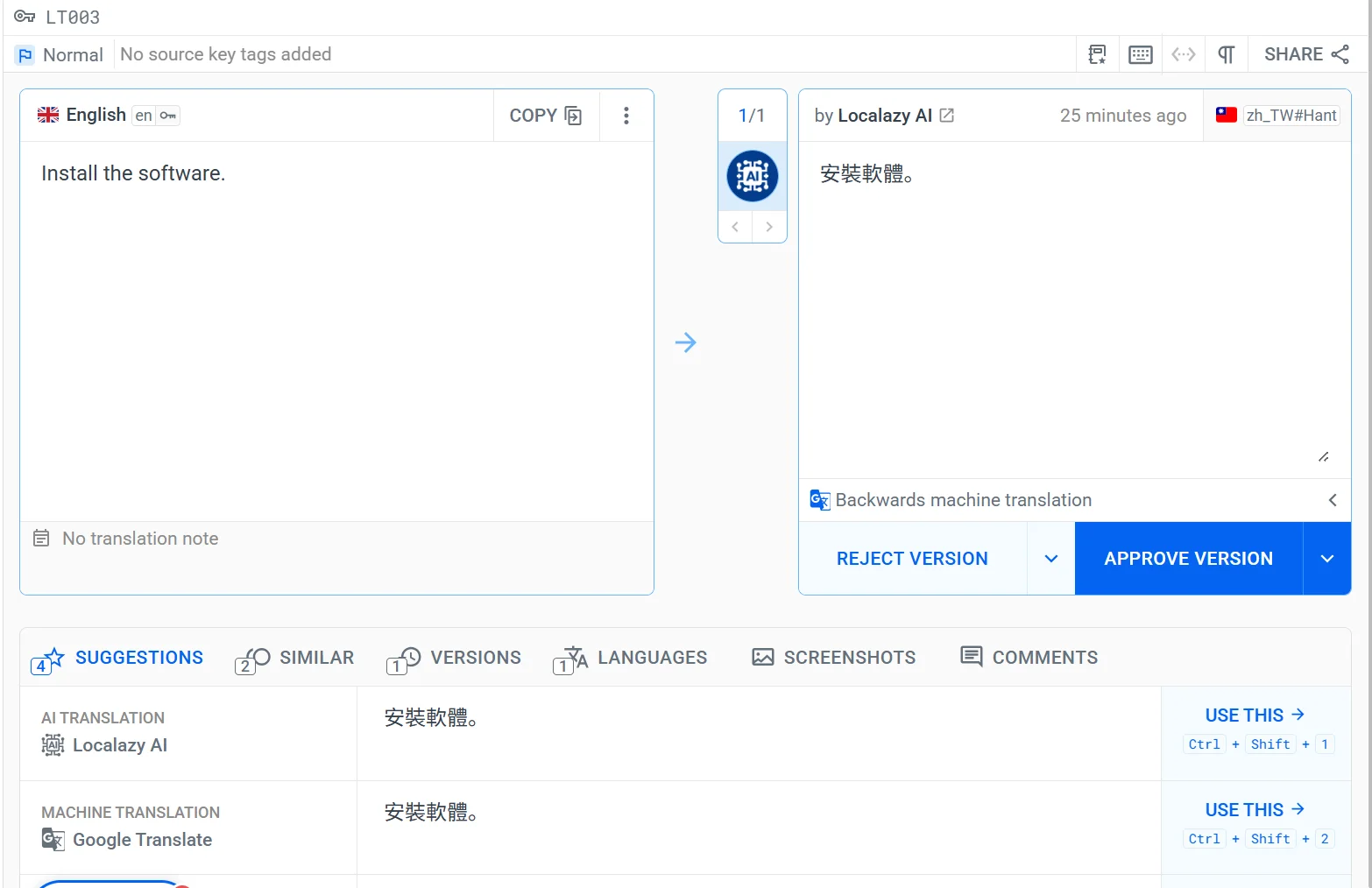
You shouldn't have to manually track locale codes or duplicate file formats. We mentioned that Localazy treats zh_HK#Hant (Hong Kong) and zh_TW#Hant (Taiwan) as separate locales. I ran a quick test to see how its AI handles this distinction using the word "Software."
This is a great benchmark because the term diverges across all three markets: 🇨🇳 Mainland China uses 软件, 🇹🇼 Taiwan uses 軟體, and 🇭🇰Hong Kong uses 軟件. Typically, machine translation engines treat Traditional Chinese as a single block. Google Translate failed here, serving the Taiwanese term to the Hong Kong locale. But because Localazy explicitly separates the markets, its AI got all three right on the first pass.
Clear context cues
When you write down your decisions on register, idioms, and vocabulary, you attach them to your project as a Style Guide and Glossary. Localazy AI reads them and adapts to your project's specific needs directly. It uses those rules to translate standard strings across your projects, which keeps the text consistent.
QA checks & visual context
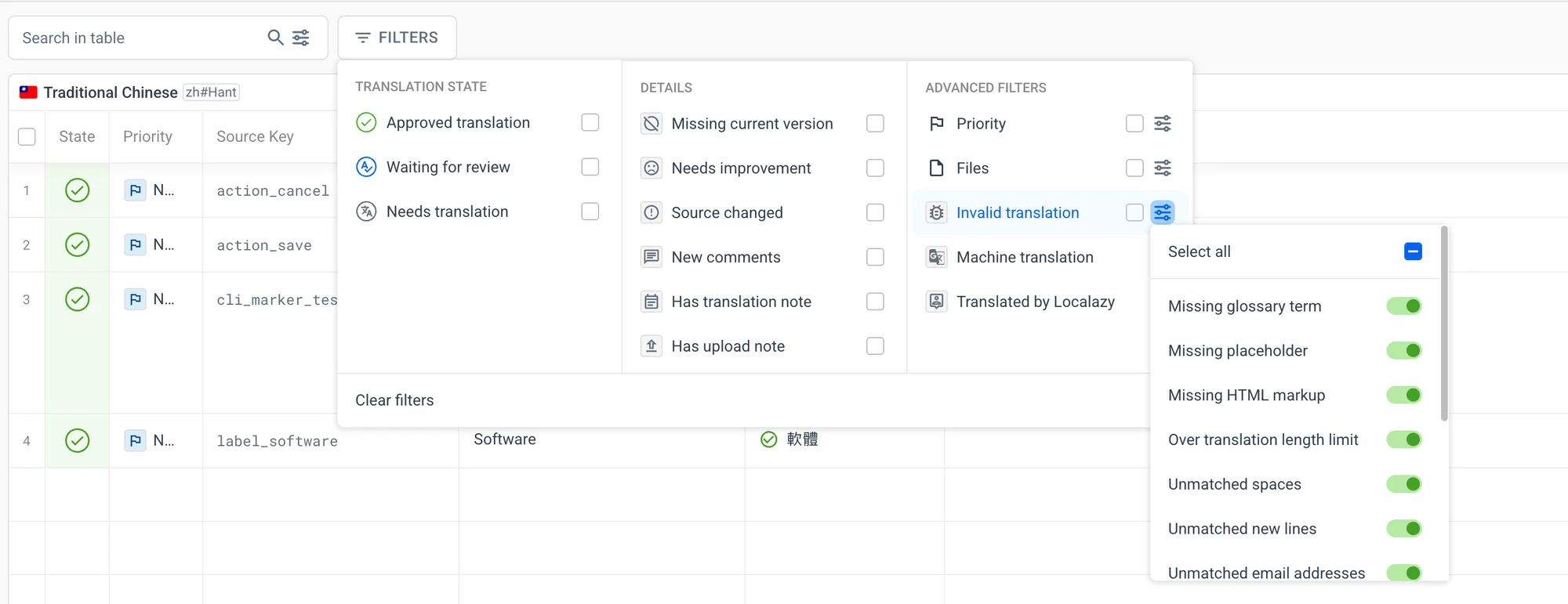
As your app goes through routine updates, built-in QA Checks automatically flag missing placeholders and formatting mistakes before they ship. This is a very important capability to use especially right before a big release, when dozens of new strings ship at once and a single missed placeholder can crash a screen.
You can also avoid the contextual errors we looked at earlier by seeing the text inside the actual UI. Localazy’s Figma plugin syncs translated strings directly to your artboards. You can spot broken layouts, fix line wraps, and adjust spacing before handing the files off to developers.
Human intervention, Releases & more
At any point during this process, you can always order human services: professional human review, context building, localization testing, and professional translation from our vetted experts, as well as onboarding your own team colleagues or native linguists you trust.
For ongoing work after launch, the Releases feature can help you manage different translation versions and branching to safely push updates without breaking your live app. This is especially useful if you're going to launch in the Mainland later, or if you're testing new strings in a beta while your stable release still runs on the old file. For example: if you catch a Hong Kong string using the wrong character (say 計畫 instead of 計劃) you can fix it in a new release and test it there first, while the live app keeps running on the current file until you're ready to push the correction.
🚀 Start with the decisions only you can make
Whenever I look back at the Chinese localization projects I worked on that went well, the language itself was rarely the biggest hurdle. The core challenges were strategically solved during the initial scoping.
A platform can manage your files, scripts, and locale formats, but it cannot make those baseline choices for you. Before even translating your content, you need to:
- Choose between mainland or overseas markets.
- Map out the regional scripts.
- Define where AI falls short and where you need human experts.
If you are ready to start, you can set up your Chinese locales in Localazy for free, run a few real strings through, and see how it behaves. If you prefer to have someone help you map out the process, you can book a demo with us or order a consulting session with our experts to ask your legal, market choice and QA questions. A solid expansion to Chinese markets starts with good preparation.