Design Localization
for stunning visuals

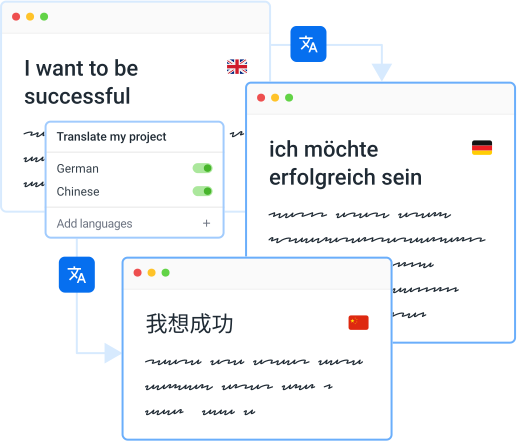
Localazy facilitates the translation of your multilingual designs and visual content in Figma and streamlines the whole process of visual assets localization.
Start now
Start for free.
No card required.
Translate your content

Great companies choose Localazy

Scaleway
Rouvy
PriceHubble
Kortext
Moody's
unicef
Wella
Doosan Robotics
Speechify
CTS EVENTIM Solutions GmbH
Appspace
LEDVANCE

Why Art Directors choose Localazy

Get your project translated or reviewed by professional native speakers directly inside the platform.
Read article
Localization team on autopilotNo need to manage an entire localization team
Integrate with your stack50+ integrations and growing
Faster international growthAgile localization platform that puts you in control
Setup & forget solutionEasy CI/CD integration + translation delivery options
Easy to start and usePowerful CLI for devs & intuitive UI for the rest

Localazy integrates with your stack

AndroidiOSReactVue.jsAngularJavaScriptJSONXLIFFStrapiFigma
AI translation & post-editing
Achieve faster translations and better quality with Localazy AI, and professional human reviewers on the platform!
Multilingual marketing tools
Translate your marketing copy, app store descriptions, meta content and other texts with Localazy for maximum effectivity.
Advanced dev tools
Work with the powerful CLI tool, variety of CI/CD options, SDKs, libraries, and more for a great developer experience!
Proactive quality assurance
Spend time with your code and forget about translations. Localazy is here to keep track so you can have a peaceful mind.
Stop guessing with shared memory
Share your own approved translations and get proven translations from thousands of other Localazy projects in return.

Enjoy localization on autopilot!

🔥 Your localization team is waiting ⏰

Sign up now
Topography lines

How does it work Starting with Localazy

Upload your texts

Upload your content in one of the supported file formats , connect your favorite CMS or use our developer-friendly CLI to automate the process.
Translate
Ready for projects of all sizes

💸 Start for free or pick a plan that suits you 🎀

See pricing options

Explore Localazy

01
Translation Interface
02
Pro-active Reviews
03
Glossary of Terms
04
User Management
05
Context Tools
06
File Management
How Art Directors rate Localazy?
Get more languages now

💸 Get ahead of your competitors 🏆

Sign up

More about Localazy for Art Directors

Here’s a list of problems that might surprise you unprepared during the design process:

  • Bidirectionality (LTR/RTL) of languages
  • Distribution of word lengths in various languages
  • Copying strings from design to code (time-consuming duplications)
  • Continuous design localization problem & keeping track of updates
  • and more…

Figma Plugin by Localazy helps to resolve these problems with ease.

Last updated: 21/09/2022

A seemingly perfect design in one language might not necessarily be suitable for every localized variant. And it is the best practice to resolve problems that might appear before implementing the feature.

  1. Upload texts from Figma into Localazy.
  2. Add languages.
  3. Quickly translate strings using the MT pre-translate feature.
  4. In Localazy Figma Plugin, download the pseudo-localized content.
  5. Test several translations, update the design and fix emerging issues.

Read more about Features & Workflows in the documentation.

Last updated: 11/11/2025

Sometimes, when using the Figma Plugin by Localazy, you might encounter an issue that after successfully uploading your text content and translating it in Localazy, when you try to download the translated texts back to Figma, nothing happens.

The most common cause of this issue is missing fonts. Figma should notify you about missing fonts when you open the file by an indicator in the top toolbar.

There are two solutions:

  1. Install the missing fonts in your system and get the Figma Font Service if you use Figma in your web browser.
  2. Change the texts in Figma to a different font style.

Learn more about solving missing fonts in Figma

Last updated: 26/05/2023

Web Upload: The web upload feature is a user-friendly interface provided for uploading screenshots. You can simply drag and drop your screenshot files into the designated area or browse your files to select them. Once the screenshots are uploaded, you can link them to specific phrases in your localization project. This is particularly useful when you want to provide visual context for the phrases being translated. It’s a straightforward process that doesn’t require any technical expertise.

API: For more advanced use cases, we offer a robust API. This allows you to automate the process of uploading and linking screenshots. If you have a large number of screenshots or if you need to integrate this process into your existing development or deployment workflows, the API can be a powerful tool. The API is well-documented and provides flexibility for custom integration. This means you can tailor the API to suit your specific needs, whether you want to automate the upload process, integrate it with your CI/CD pipeline, or build custom features on top of it.

Figma Screenshots: If you’re using Figma for your UI/UX designs, you can take advantage of the our Figma plugin. This plugin allows you to directly upload your screenshots from Figma. It streamlines the process of keeping your designs and localization project in sync. Whenever you update your designs in Figma, you can easily update the corresponding screenshots in your localization project. This ensures that your translators always have the most up-to-date visual context when translating phrases. Find out more about Figma Screenshots feature.

Last updated: 11/11/2025

If you’re using Figma as your source of truth, Export Aliases can significantly streamline your workflow. You can upload all your text content from Figma into a single Localazy file (using text node IDs as keys), then use Export Aliases to organize how this content gets exported to your code repositories.

This approach works especially well with Key Clustering, which automatically groups duplicate content. Once set up, your developers can access translated content in the exact format and location they need, while designers can continue working in Figma without changing their process.

Learn more about using Figma as a source of truth with Export Aliases

Last updated: 11/11/2025