Get more organic traffic
with multilingual SEO

Translate your website content and metadata. Build optimized landing pages tailored for specific locales. Get more pages indexed and grow organic traffic with Localazy.
Start now
Start for free.
No card required.
Translate your content

Great companies choose Localazy

Scaleway
Rouvy
PriceHubble
Kortext
Moody's
unicef
Wella
Doosan Robotics
Speechify
CTS EVENTIM Solutions GmbH
Appspace
LEDVANCE

Why SEO Specialists choose Localazy

Get your project translated or reviewed by professional native speakers directly inside the platform.
Read article
Localization team on autopilotNo need to manage an entire localization team
Integrate with your stack50+ integrations and growing
Faster international growthAgile localization platform that puts you in control
Setup & forget solutionEasy CI/CD integration + translation delivery options
Easy to start and usePowerful CLI for devs & intuitive UI for the rest

Localazy integrates with your stack

AndroidiOSReactVue.jsAngularJavaScriptJSONXLIFFStrapiFigma
AI translation & post-editing
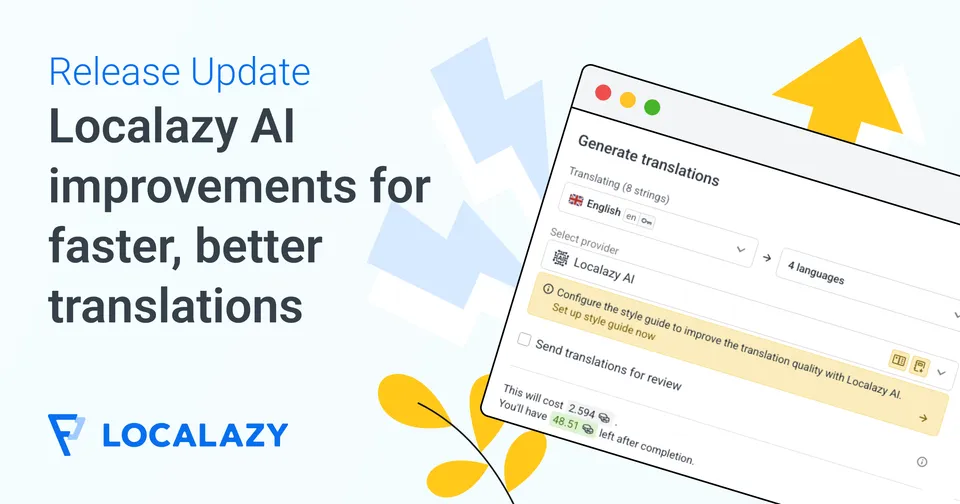
Achieve faster translations and better quality with Localazy AI, and professional human reviewers on the platform!
Multilingual marketing tools
Translate your marketing copy, app store descriptions, meta content and other texts with Localazy for maximum effectivity.
Advanced dev tools
Work with the powerful CLI tool, variety of CI/CD options, SDKs, libraries, and more for a great developer experience!
Proactive quality assurance
Spend time with your code and forget about translations. Localazy is here to keep track so you can have a peaceful mind.
Stop guessing with shared memory
Share your own approved translations and get proven translations from thousands of other Localazy projects in return.

Enjoy localization on autopilot!

🔥 Your localization team is waiting ⏰

Sign up now
Topography lines

How does it work Starting with Localazy

Upload your texts

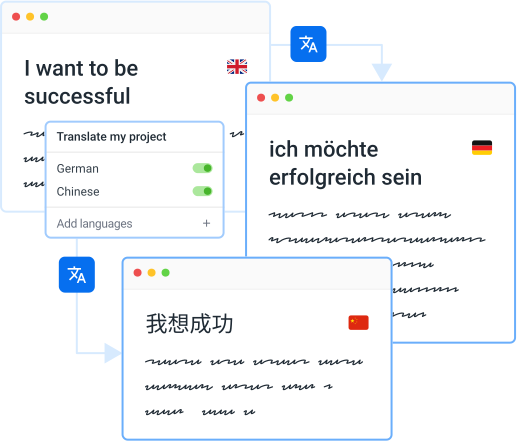
Upload your content in one of the supported file formats , connect your favorite CMS or use our developer-friendly CLI to automate the process.
Translate
Ready for projects of all sizes

💸 Start for free or pick a plan that suits you 🎀

See pricing options

Explore Localazy

01
Translation Interface
02
Pro-active Reviews
03
Glossary of Terms
04
User Management
05
Context Tools
06
File Management
How SEO Specialists rate Localazy?
Get more languages now

💸 Get ahead of your competitors 🏆

Sign up

More about Localazy for SEO Specialists

Translating your website in multiple languages is crucial for reaching a wider clientele. No other approach connects with people deeper than words in their native language.

Translating a website can be done in two ways: using human or machine translation. 🤓

For human translations, you’ll usually need to hire an agency that translates your web pages in the required languages. Translations by real people are impeccable because a translator knows to retain the structure, language nuances, and context.

Then, we can also translate a website using machine translation which relies on artificial intelligence to provide us with translations of our web content. When speaking about translation through AI, Google Translate intuitively comes into mind.

Artificial intelligence feeds on large quantities of data, but it can’t ever replace a real translator who can distinguish between different contexts and language nuances. 😵

A website contains both general and specific types of content. Using Localazy’s API to translate your website means you can effectively leverage both human and machine translations.

How to do it then?

  1. Prepare your website for internationalization and localization.
  2. Choose a suitable translation API.
  3. Integrate your website with the solution of your choice.
  4. Choose languages and content to start translating.
  5. Optimize and grow your multilingual content.

As a continuous localization platform, Localazy gives you the power of using its API to translate all types of content on your website. And best of all, it’s free to use!

Last updated: 01/08/2022

There are two ways to translate the website content: as a visitor or as an owner. From both of these perspectives can be employed different tools and approaches. ⚒️ But first, let’s explain how translation can be done.

💪 How do human translators work? #️⃣

Traditional translation agencies employ human translators to translate web content for their clients. The process is done the old way, mechanically translating each sentence while going through the pages. The human eye is indispensable for producing excellent localized content, no matter the advanced artificial intelligence algorithms you’re using for machine translations.

Humans can distinguish between similar contexts, language nuances, and figurative uses to select the right words. However, translators will charge for the time they spend translating common phrases, which are avoidable costs thanks to our ShareTM.

🦾 How does machine translation work? #️⃣

Artificial intelligence was first used for small translation tasks, but now it has evolved so much that it can substitute human translations entirely in some cases. Well-known machine translation service providers like Google Translate are responsible for a large amount of automatically translated content. However, they’re responsible for big bloopers as well. 😂

The golden middle way produces the most optimized results. Machine translations (MT) result from algorithms; therefore, they’re unable to detect figurative contexts, language nuances, and cultural differences. Automated translations save time and are worth the costs when they are being done under human supervision.

🌐 How to translate a website using Chrome as a visitor? #️⃣

The built-in Chrome feature allows visitors to translate a website from a language different from the one they’ve configured their browser to use. Its use is relatively straightforward, and users aren’t required to install or download anything as the feature comes with the Chrome browser by default. 😀

  1. Visit a page with content in a foreign language 😵
  2. Tap on the Google Translate icon on the right of the search bar to select the target language. 🎌 (Sometimes, Chrome will display a window with translation automatically)
  3. Three dots on the right reveal an extensive list of languages as options. ▪️▪️▪️
  4. Voilà! The page will be translated into the desired language. 🥳️

🏹 How to translate a website as an owner? #️⃣

Localizing your website for local markets is proven to increase sales and brand awareness for all kinds of industries. Deciding to localize your website means opening doors for clients who were unreachable before, but how can you go multilingual with your website? 🤔

If visitors are translating your website using the Google Translate feature, the chances are that the message of your content will be lost in the translation. Localization services like Localazy preserve the originality of your content through quick and efficient localization.

Generally, there are two ways to translate a website into multiple languages: human translation or machine translation. Everything else is a variant or mix of these two.

🎯 How to translate a website using Localazy? #️⃣

So, what’s the most optimal solution for translating your website? We’ve found that a combination of both human and machine translation can yield wonderful results at an affordable cost. With support in over 80+ languages and 3000 locales, Localazy is the result of this vision. Take the lazy but effective route to website localization here. ✅

Here are the steps to be followed for translating a website you own: #️⃣

Last updated: 17/10/2025

Before you dive into developing a multilingual content strategy, it is essential to consider the following aspects:

  • Your target audience and what languages they speak - to choose which languages pick first
  • The purpose of your website or content & scope of what is to be translated
  • The resources you have available (e.g., budget, staff, time) - this will determine the quality of localization you can expect

Learn why localization is important for growth

Once you have considered these factors, you can start to develop a plan for creating and managing your multilingual content. This may involve creating separate landing pages for each language, internationalization of your current website, and using translation and localization services to make your content available in multiple languages.

Localazy can help you with multilingual content management, procurement, and delivery.

Last updated: 01/08/2022