You've translated your app into 15 languages. Your accessibility audit passed with flying colors. Your users should be happy, right?
Well, it's not that easy.
While building Accesstain (a digital accessibility platform), I've been studying how teams approach multilingual accessibility. What I found surprised me: most companies think they're inclusive when they're actually creating new barriers. The problem is that teams treat accessibility and localization as separate problems when they're really two sides of the same coin.
🫥 Hidden accesibility failures have a cost 🔗
According to the WHO, over a billion people worldwide live with some form of disability. Many others aren't fluent in your primary language or have limited literacy. When you combine language barriers with accessibility needs, the user group grows massive. Yet most teams have no idea how their localized versions actually perform for these users.
Sure, your English site might have passed accessibility tests, got translated, and shipped. But the Spanish screen reader user encounters English alt text. The German user with dyslexia faces sentences twice as complex as the original. The Arabic user finds a right-to-left interface that still thinks like a left-to-right design. What we might consider edge cases are actually predictable failures that happen because our tools and workflows weren't designed for this reality.
Think of a public service: if a healthcare website provides information in multiple languages, the goal is to make sure that patients in those languages can access crucial info about their health. Accessibility often relies on good localization to make services functional and equitable for diverse users.
When you combine language barriers with accessibility needs, the user group grows massive
The bottom line is that a translated product is a more accessible product in principle. But in practice, this holds true only if we localize the right way.
So, why do so many localized products still fall short on accessibility?
⛓️💥 Where 'standard' localization breaks down 🔗
Let me start with a harsh truth: just translating an interface or documentation doesn't automatically guarantee an accessible experience. Some common gaps in standard localization workflows can leave people behind. One big issue is what gets translated versus what gets overlooked.
The invisible text problem 🔗
Most workflows focus on visible content (menus, buttons, headlines) but miss the invisible strings that assistive technology depends on:
- 💬 Alt text for images that screen readers announce
- 🏷 ️ARIA labels that explain complex interface elements
- ⚠️ Form field instructions and error messages
- 📹 Video captions and audio transcripts
Translation complexity 🔗
Translators often follow the source text too closely, creating formal or complex versions that hurt readability:
- Simple English becomes legal-document French
- Clear instructions become jargon-heavy German
- Conversational tone becomes corporate-speak in Italian
Design and layout failures 🔗
According to WebAIM's analysis of over a million homepages, 55% of images already lack alt text, and 79.9% have contrast errors before translation, which adds more problems:
- ⬅️ Right-to-left disasters: Arabic or Urdu sites that don't flip layout direction, confusing users and increasing cognitive load
- 📏 Text expansion chaos: German text can be 30% longer than English, breaking interface designs
- 📑 Overflow and overlap: Translated content that gets cut off or covers other elements
📐 To help with that, Localazy has developed a Figma plugin to make sure your designs stay readable and usable in every language
Missing reading level checks 🔗
Standard practices assume accurate translation equals comprehensible translation, but teams rarely verify that reading complexity stays consistent across languages. A user-friendly English interface can become an accessibility barrier in other languages simply due to translation style.
The real cost of siloed thinking 🔗
The core issue runs deeper than missed translations or cramped layouts. Most organizations handle accessibility and localization in completely separate teams, with different tools, different timelines, and different success metrics. The accessibility team tests the English version, the localization team translates the strings, and nobody tests whether the Japanese user with low vision can use the product comfortably.
This separation creates systematic blind spots: the people who understand accessibility best don't speak the target languages; and the people who understand the target languages don't know accessibility requirements. The result are products that are technically multilingual and technically accessible, but actually unusable for the people who need both.
💡 Redesigning localization for real inclusion 🔗
So, how do we close these gaps? It starts with broadening our vision of what localization involves. While researching solutions for an accessibility project, I've studied teams that successfully crack this challenge, whether in travel, e-commerce, or SaaS. The ones that succeed don't treat localization and accessibility as separate processes, they just design them together from the start. Here are some ways an inclusive localization workflow can make a difference:
Write for translation (and for understanding) 🔗
Clear, simple writing in your source language makes everything easier. Everyone understands it better, and translators can keep that clarity when they convert it. Localization experts often read your original text first and suggest changes. They might split up long sentences or replace fancy words with everyday ones.
Rather than being picky about language, this is about making your content work for more people. Simple language helps users with lower reading levels, people learning the language, and those with cognitive differences. Some teams write style guides that translators can use in every language, keeping that friendly, readable feel no matter where their product goes.
Localize all the content, not just the obvious content 🔗
As discussed, a lot of important text lives in places like image alt attributes, form labels, ARIA attributes, error messages, and transcripts. A broader localization vision makes sure these are identified and included in the translation process. You may consider working with developers to externalize those strings into the resource files that translators work on. It also means educating translators about the purpose of these texts.
A lot of important, localizable text lives in alt and ARIA attributes, form labels, error messages, and transcripts. These need to be identified and included in the localization process, and translators need to know their purpose
Translating an error message that's off-screen or a piece of alt text is a bit different from translating a heading; here, one has to understand that context is the key. I'd say that every accessible product needs testing with real users. Get a native speaker who uses a screen reader to try your app. Have them check that buttons, image descriptions, and everything else sounds right in their language. Sure, this takes more time, but it catches problems that would shut out users who rely on these features.
Adapt design and workflows for each locale 🔗
Truly inclusive localization treats UX as more than just words. It asks, "Does this feature or layout make sense and feel natural in this language/culture?" Sometimes, the changes needed are fairly mechanical: enabling right-to-left layouts, expanding UI elements to accommodate longer text, or choosing a font that has good readability in the target script. This makes the interface immediately more usable because it aligns with users' reading patterns.
Familiar visual hierarchy reduces cognitive load for everyone, especially users with cognitive disabilities or those using zoom/magnification. Font choice is another seemingly small detail with a big impact. A font that works great for English might be illegible or just unpleasant in Japanese or Hindi. Apart from that, consider icons and imagery: not all symbols are universally understood. An envelope icon might mean "email" in the US, but could be confusing in a culture where that image isn't associated with messaging. Localization specialists can flag these and suggest more suitable alternatives for their audience (or at least supplement with text labels).
Include local accessibility testing and feedback 🔗
As discussed earlier, one really good approach is to involve users or testers from the target locale who have disabilities during your QA phase. They can provide insights that neither your base-language accessibility testers nor your translators might catch. Maybe in one language, the formal word used for a button is technically correct, but too long for a screen reader to easily speak without cutting off; a native screen reader user could catch that. Or perhaps a color choice that passed contrast checks in English looks different against the longer German text and needs adjustment. Smart localization workflows budget time for this testing instead of hoping one approach works everywhere.
You need to get localization involved from the start of your design process, not bolt it on later. Get your designers, developers, translators, and accessibility people talking to each other while you're building things. I know this sounds like it'll slow you down, but localization tools like Localazy help keep designers, developers, and translators on the same page, without the usual back-and-forth. This saves time, resources, and unnecessary ambiguities. The payoff for this effort is a product that delivers a truly equivalent experience across languages.

🦾 How AI can fix accessibility gaps 🔗
AI could solve the specific multilingual accessibility problems I've outlined, but most teams miss the opportunity entirely. They focus on translation speed rather than fixing the barriers that exclude disabled users across languages. Here's how these tools can directly address the accessibility gaps that traditional workflows create.
Generating accessible content in every language 🔗
Remember the problem of Spanish sites with English alt text? AI can generate image descriptions in dozens of languages instantly. Instead of screen reader users encountering "Close button" in English on a Spanish interface, AI creates proper alt text that reads "Cerrar botón" from the start.
The same applies to ARIA labels, form instructions, and error messages. AI can ensure these critical accessibility strings exist in every target language, not just the visible content.
In the case of Localazy, if you include alt text and accessibility labels in your localizable files, the platform will help you easily identify and translate them accordingly.
Maintaining reading accessibility across languages 🔗
When translations come back overly complex (e.g., turning simple English into formal German legal-speak), AI can flag the reading level mismatch. It can identify when translated content exceeds the cognitive load of the original, alerting teams that users with dyslexia or limited literacy will struggle.
AI can also rewrite complex translations into simpler versions automatically. Rather than leaving translators to figure out appropriate complexity levels for each audience, AI tools can create simplified versions that keep the same readability as the original. These tools spot phrases and cultural references that might confuse people reading in a second language, offering clearer options instead.
Localazy's Style Guide allows you to set tone, formality, sentiment and audience expertise details per language, prompting Localazy AI to automatically follow the instructions you set for any specific audience every time you translate
Catching design-breaking issues 🔗
When German text expands 30% longer than English and breaks your carefully designed interface, AI can predict these problems before launch. You don't need expensive, specialized tools to catch these problems. You can simply feed your design specifications and target languages to your favorite LLM, and it'll flag potential overflow issues, cramped clickable areas, or contrast problems with longer text, all without additional investment.
For right-to-left languages, AI can verify that RTL layouts maintain proper accessibility structure. It can check whether screen reader navigation order makes sense when mirrored, or whether keyboard navigation still works logically in Arabic or Hebrew versions.
Automating multilingual media access 🔗
Speech recognition AI can transcribe audio accurately in many languages and auto-translate captions, making it feasible to provide video accessibility in 10 languages instead of just English. This directly solves the problem of Deaf users being excluded from non-English content.
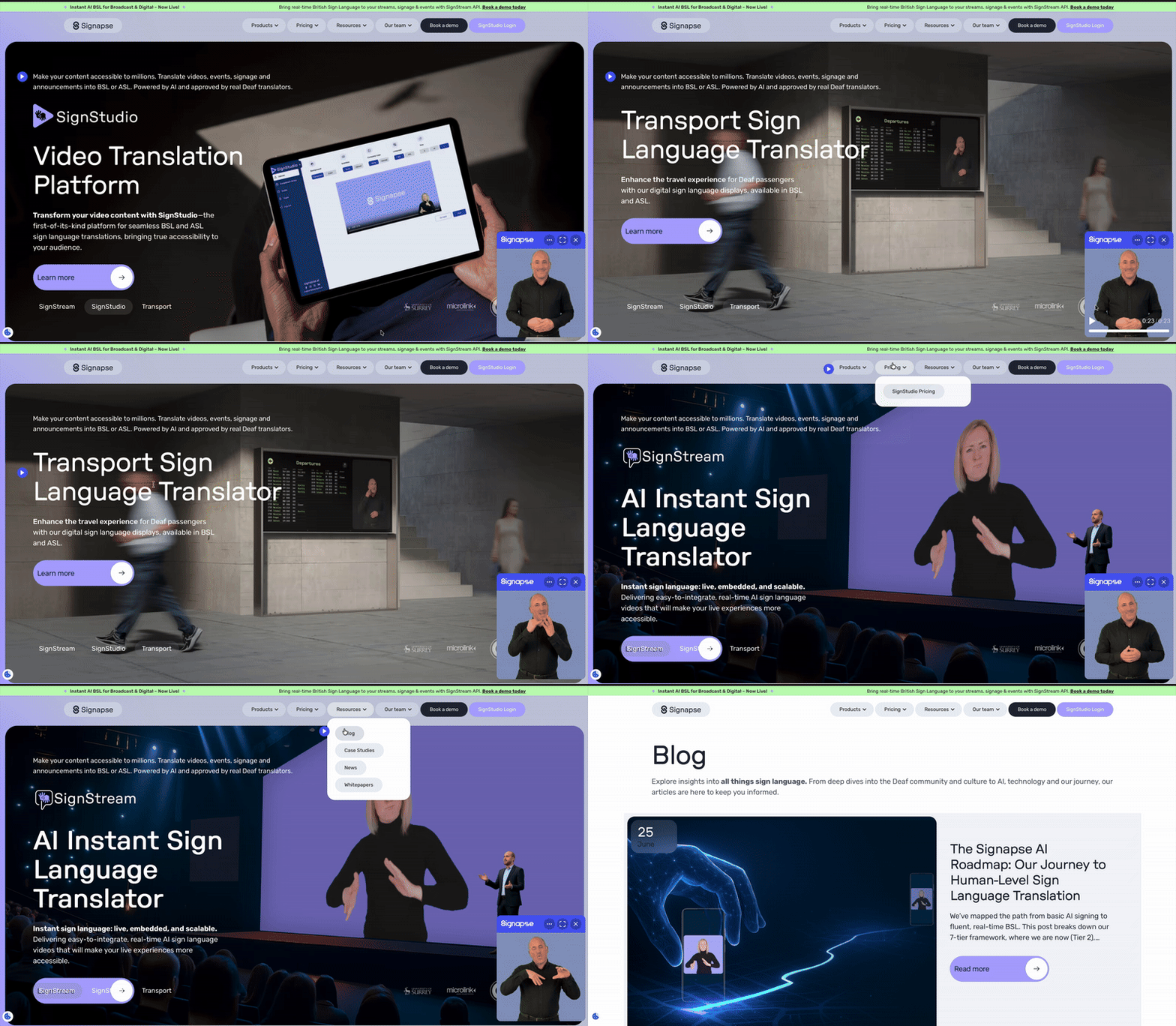
Even more promising, companies like Signapse use AI to generate sign language translations via digital avatars, creating thousands of signed versions for public announcements and web content.
⚠️ As always, it needs human judgment 🔗
Sometimes AI stumbles where context matters the most. Auto-generated captions that mis-transcribe critical words can be worse than no captions. Translation engines sometimes choose terms that are technically correct but inappropriate for accessibility contexts; like using formal medical terminology when simple language would be clearer.
When Apple used AI alone to summarize news articles, it produced errors that made headlines. The lesson applies here: AI excels at identifying problems, generating starting points and scaling, but human experts must verify that solutions actually work for disabled users in each target language.
Hybrid approaches can make multilingual products truly achievable without a massive resource allocation. Instead of choosing between breadth (many languages) and accessibility depth (proper support for disabled users), you can deliver both
In practice, a winning approach could look like this:
- Teams use LLMs to quickly assess potential problems across multiple languages by describing their interfaces and target languages; asking questions like 'Will this checkout flow have text overflow issues in German?' or 'What cultural accessibility concerns might arise with this Arabic layout?'.
- Human experts then focus their time on the problems AI flagged as most probable, rather than manually reviewing everything. Translators verify whether predicted text expansion will actually break layouts, and accessibility specialists confirm whether flagged navigation issues would really impact users.
🦻 Building systems that work for everyone 🔗
All in all, better translation or better accessibility testing applied in isolation won't solve the problem. Building systems where these disciplines work together by default will. This means that accessibility requirements get automatically included in translation briefs, layout testing includes multiple languages from the start, success metrics account for both language and accessibility barriers, and so on.
This integrated approach benefits everyone: users get experiences that actually work in their language with their assistive technology, teams catch problems earlier when they're cheaper to fix, and products expand to new markets without creating new barriers.
It all boils down to not treat accessibility and localization as separate problems. At the end of the day, the goal is a product that anyone can pick up and succeed with, without frustration, whether they're viewing it in English, Spanish, Japanese, or any other language. If you've invested in making a great product, extending that greatness to all audiences through accessible localization is the natural next step.
👩🦯➡️ Making it real: 3 accessibility checklists 🔗
If you're shipping in multiple languages, you're already committed to inclusion. The question is whether you're delivering on that commitment. True digital inclusion means users succeed regardless of their language or abilities.
Start by:
- Auditing one key user flow in your non-English versions. Can a screen reader user complete it successfully in Spanish? Does your German interface still work when text expands? Are error messages helpful in Japanese, not just accurate?
- Checking those hidden accessibility strings: the alt text, ARIA labels, and form instructions that assistive technology depends on. If they're still in English while everything else got translated, you found your first fix.
- Testing with real users who speak the target language and use assistive technology. Their feedback will reveal gaps that neither your accessibility team nor translators would catch working separately.
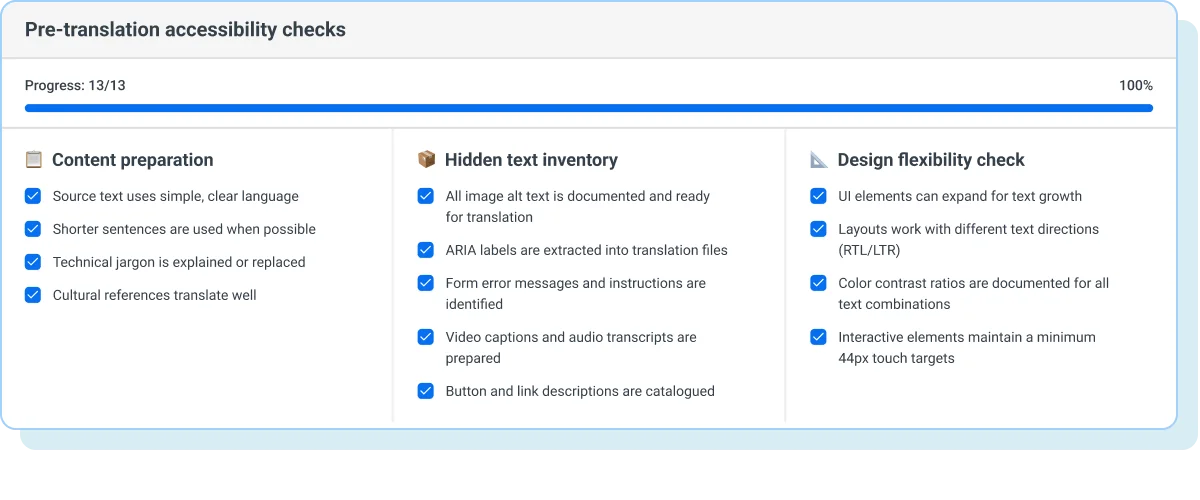
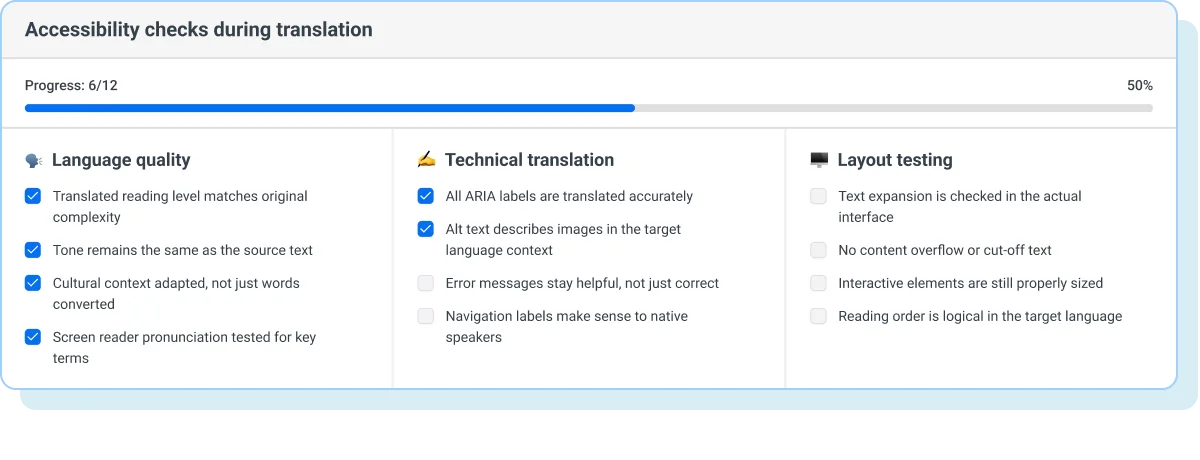
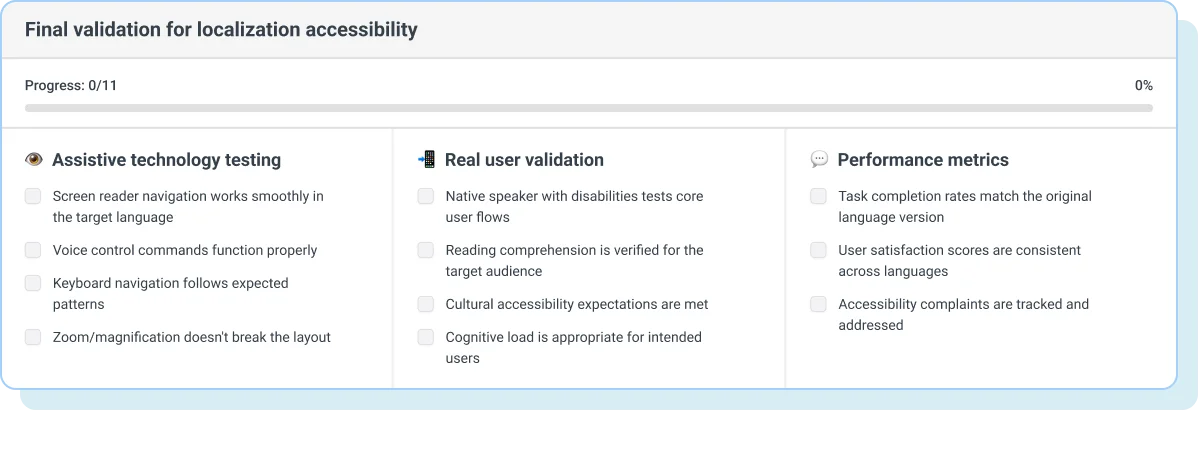
Below you'll find the checklists you can use to make this process easier.
Before you translate 🔗
When translation is in progress 🔗
For final validation 🔗
📋 Free accessibility cheatsheet 🔗
Bottom line is: the tools and knowledge exist to make truly inclusive multilingual products. The question is whether you'll build accessibility and localization integration into your process or keep treating them as competing priorities. Your users in every language deserve experiences designed for their actual needs. When you solve for accessibility and localization together, you create products that truly work for everyone. And that's something worth building.