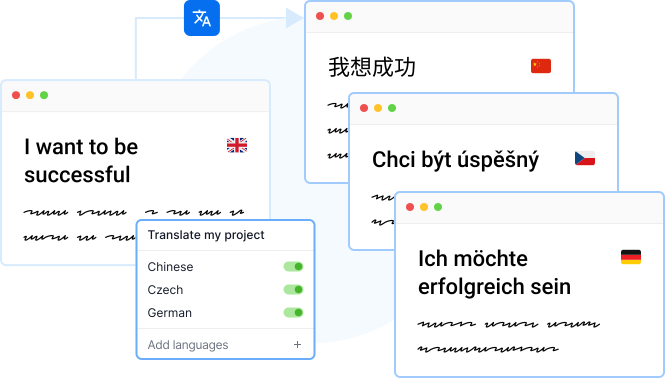
Translate your content

String Translation

Manage your string translations the way all team members will love it

Translate Externalized Strings

Make it easy-peasy for all the team members of your team, from product to marketing, with a single solution to all your content translation needs.

Powerful CLI

Powerful CLI

Our GUI is powerful, but our CLI is one of a kind. Check it out for yourself.

Discover CLI

String Translation

You can upload your strings directly from you IDE using our available libraries. The reason behind this is the advanced analysis of translatable strings. Localazy will find all strings and will also recommend ignoring common private strings if they are not flagged.

Is this way of uploading useful also for apps which already have translations? #️⃣

Of course, this works for both starting and enrolled apps. Moreover, you can easily migrate all your work into Localazy and finish your current unfinished translations sooner thanks to Localazy ShareTM.

Last updated: 30/03/2026

A source key is a segment of text stored in Localazy, representing content in your source language. It’s a single string of text in your source language, e.g., a button label or a short paragraph of text in a dialogue window of your application. It can even be a short blog article written in Markdown syntax. In the picture below, there are three source keys; as you can see, each contains a different type of content.

You can imagine a source key as a single row in a spreadsheet you were previously using for translations.

Examples of source keys in localazy

Translations to other languages are unlimited, and translating your project to more languages does not affect the number of source keys used. I.e., the content of one source key translated into 10 languages still counts as one source key.

Last updated: 08/01/2024

Formally, to get a document translated into other languages, all you had to do, was send it to a translation office and receive the translation within a few days in exchange for a fee. When speaking of translating software, the process is different. 😅

Software programs are written in programming languages that translators don’t understand. Considering that even a simple comma can ruin the entire software’s functionality, no programmer likes having translators put their hands on the code. 

So, translating software without hazards requires content to be separated from the code. You can translate your software by extracting the content into separate files (e.g., JSON, XLIFF, XML, etc.) and then sending it to translators. 

An even better way to do it is to use a translation management system, such as Localazy, which takes care of the translation process and seamlessly integrates with your software. Making updates and working with professional translators on sophisticated software is not difficult and maybe even enjoyable with Localazy. Localazy also offers 50+ integrations, and one of them is an API that you can use to exchange data between your app and Localazy and handle everything programmatically.

Localazy API integrates into your software to remove the need to deal with translation files outside the development once and for all.

Besides rapid updates, what makes using our API exceptional are multiple possible integrations and the human touch offered by real translators when you go for the Human translation services. 😉

Further reading #️⃣

Last updated: 25/06/2026

To translate PO and POT files, you could just open the file and translate all content on your own or with the help of machine translation engines (e.g., Amazon Translate). However, approaching translations this way is messy, error-prone, and tedious. You can do better!

Translating PO and POT files is simple with Localazy. Sign up for free, create a new translation project and upload your PO, or POT file. Head to the Translations tab to add new languages and start translating.

Localazy gives you a clean UI for translating PO and POT files. Enjoy built-in machine translation suggestions and all features a solid TMS has to offer!

To translate PO (or POT) files automatically, you have two (premium) options:

Last updated: 25/06/2026

To translate XLIFF files, you can simply edit the files and translate all content on your own or with the help of machine translation engines such as Google Translate. But this approach is messy, error-prone, and tedious. There is a far better way of doing this.

Translating XLIFF files is simple with Localazy. After signing up for free, create a new translation project and upload your XLIFF file. Head to the Translations tab, add new languages and start translating.

Localazy gives you a clutter-free interface for translating XLIFF files content, with built-in machine translation suggestions and all features a sound translation management system should offer!

To translate XLIFF files automatically, you have two (paid) options:

Last updated: 25/06/2026

To open RESX files, you can use any text/code editor that supports the format (such as Microsoft Visual Studio and its extension called ResX Resource Manager), use online services, or upload it to Localazy - the online translation management system.

Localazy offers a clutter-free way to browse, edit and manage localization files of many formats, including RESX.

To open RESX files using the Localazy interface, do the following;

  1. Sign up for free
  2. Create a translation project
  3. Upload your RESX file (via file upload or use the Localazy CLI)
  4. Browse the strings inside, translate your RESX file to another language, and more…

Learn how Localazy works in the Getting Started Guide.

Learn more about Localazy integrations.

Resources #️⃣

CLI: RESX File Format CLI Quick Start - RESX

Last updated: 14/10/2025

Localazy integrates with your stack

AndroidiOSReactVue.jsAngularJavaScriptJSONXLIFFStrapiFigma
Easy to configure string translation

The way you like it

Start Now
Software Development
Education

Readmio automated their localization workflow to deliver magic to every story

Using Localazy, Readmio made the localization process easier for both developers and translators, reaching families in 135 countries. The expansion from 2 to 9 languages went smoothly, and more are already in the pipeline (French, Mandarin and other Asian languages). With translations running seamlessly, the team can now focus on adding new stories instead of fixing localization issues.

Features in use
Machine translation suggestions
Review process
Contributor control
IT
Computer Software

TICGAL propelled their mobile app for GLPI with a scalable translation flow

Gapp is now available in 24 languages, with community-driven translations that continue to expand its reach. The app has been adopted by organizations such the Spanish Ministry of Science and Innovation, the University of La Rioja (UNIR) and RCS Angola, which uses Gapp to manage over 100 field technicians.

Features in use
Connected Projects
MT Pre-translate
Crowdsourced translations
Finance
Software Development

Mindnow delivered a multilingual digital banking experience for Swiss families

Clanq now supports three of the country's official languages: German, Italian, and French, plus English. With Localazy, Mindnow can keep adding new features to the app without huge translation overhauls, meeting Cornèr Bank’s high standards as well as the demands of the Swiss financial landscape.

Features in use
Intuitive interface
Localazy CLI
Machine Translation
Load More