i18n & l10n support
for WordPress devs

Localize your WordPress plugins or integrate translation management capabilities as a new feature with Localazy - a developer-first localization and translation platform.
Start now
Start for free.
No card required.
Translate your content

Great companies choose Localazy

Scaleway
Rouvy
PriceHubble
Kortext
Moody's
unicef
Wella
Doosan Robotics
Speechify
CTS EVENTIM Solutions GmbH
Appspace
LEDVANCE

Why WP Plugin Creators choose Localazy

Get your project translated or reviewed by professional native speakers directly inside the platform.
Read article
Localization team on autopilotNo need to manage an entire localization team
Integrate with your stack50+ integrations and growing
Faster international growthAgile localization platform that puts you in control
Setup & forget solutionEasy CI/CD integration + translation delivery options
Easy to start and usePowerful CLI for devs & intuitive UI for the rest

Localazy integrates with your stack

AndroidiOSReactVue.jsAngularJavaScriptJSONXLIFFStrapiFigma
AI translation & post-editing
Achieve faster translations and better quality with Localazy AI, and professional human reviewers on the platform!
Multilingual marketing tools
Translate your marketing copy, app store descriptions, meta content and other texts with Localazy for maximum effectivity.
Advanced dev tools
Work with the powerful CLI tool, variety of CI/CD options, SDKs, libraries, and more for a great developer experience!
Proactive quality assurance
Spend time with your code and forget about translations. Localazy is here to keep track so you can have a peaceful mind.
Stop guessing with shared memory
Share your own approved translations and get proven translations from thousands of other Localazy projects in return.

Enjoy localization on autopilot!

Your localization team is waiting

Sign up now
Topography lines

How does it work Starting with Localazy

Upload your texts

Upload your content in one of the supported file formats, connect your favorite CMS or use our developer-friendly CLI to automate the process.
Translate
Ready for projects of all sizes

Start for free or pick a plan that suits you

See pricing options

Explore Localazy

01
Translation Interface
02
Pro-active Reviews
03
Glossary of Terms
04
User Management
05
Context Tools
06
File Management
How WP Plugin Creators rate Localazy?
Get more languages now

Get ahead of your competitors

Sign up

More about Localazy for WP Plugin Creators

AI Translation endpoint is available for users on Professional and upper tiers. Each translation request consumes Localazy credits from your Localazy account balance. The number of credits used depends on the number of translated words.

You can use all of the Management endpoints absolutely for free. However, there are some limitations to prevent abuse.

Learn more about the limitations of Localazy API in the documentation.

Last updated: 15/04/2026

After you sign up, you can obtain the tokens at https://localazy.com/developer/tokens

Project Token

  • The project token gives you an access to a single project in Localazy.
  • Each token is automatically granted a read and write access.
  • Each project token has access to all availabe API endpoints.

Translation Token

  • The translation token gives you access only to the AI Translation endpoint, with its context derived from the respective project in Localazy
Last updated: 15/04/2026

Using translation software is the new normal for translation, but how can they assist in translating your app or web content? It usually happens through APIs. For understanding translation APIs is we must understand what an API is. 

API stands for Application Programming Interface. Basically, by using an API, two applications can communicate with one another.  

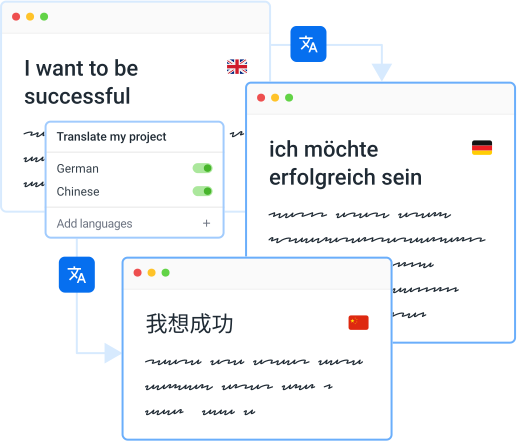
A translation API is an interface that lets you send text to a service and get translations back programmatically. Instead of copying strings into a translation tool manually, your code sends a request and receives translated content in the response. This is useful when you want to translate content on the fly, integrate translations into your build pipeline, or automate parts of your localization workflow.

Most translation APIs work as simple input/output endpoints. You send text in one language, pick a target language, and get the translation back. Services like Google Translate or DeepL offer this kind of API. It works well for quick translations, but it doesn’t know anything about your product, your terminology, or how you want things to sound.

Localazy Translation API #️⃣

Localazy now offers a translation endpoint as part of its existing API: POST /projects/{projectId}/ai.

It gives you access to Localazy AI and other machine translation engines directly from your code.

A few things that make it different from a generic translation API:

  • You can translate multiple items in a single request, including plural forms.
  • You can pass optional context along with your strings, so the translation engine understands what it’s translating and where it appears.
  • And you can configure fallback engines, so if one provider doesn’t support your target language, the request still succeeds using an alternative.

Because the endpoint is tied to your Localazy project, translations can take advantage of your existing glossary and style guide. This means your API-driven translations stay consistent with everything else in your project.

Translations made through this endpoint consume credits from your account, the same credit system used across all Localazy services.

Last updated: 15/04/2026

Countless translation APIs exist, making the process of finding the best API for translation quite challenging.

The best API for translation should provide impeccable translations and allow seamless communication, but other decisive features? Here are three: 

HTTPS protocol: Data sent over the internet falls easy prey to attackers due to poor security. SSL (Secure Sockets Layer) certificates are integral for providing secured cloud translations. This is verifiable by checking whether the URL of the API you are using begins with HTTPS, as domains secured with SSL start with HTTPS. 🔐

Control over data: Users put in information from the moment they log into the service provider. Quality translation API providers allow users to manage and delete their data. Localazy allows its users to delete their information and use each other’s data positively by giving them the option to exchange already once done translations with other users through ShareTM

Format regulation: It requires time and energy to format the translated or localized content manually. The ideal translation API maintains the format needed by users and even better if it provides conversions. 

Before selecting a translation API, check the supported features and whether they’re helpful to you. Most machine translation engine APIs out there include all three of our features. However, quality translations require a human translator to review everything before hitting the live launch button.

Localazy gives you the power to have content delivered via API translated and reviewed by humans & removes the need for hiring a translator from your side. Read more here. 😎

Last updated: 21/12/2021

Formally, to get a document translated into other languages, all you had to do, was send it to a translation office and receive the translation within a few days in exchange for a fee. When speaking of translating software, the process is different. 😅

Software programs are written in programming languages that translators don’t understand. Considering that even a simple comma can ruin the entire software’s functionality, no programmer likes having translators put their hands on the code. 

So, translating software without hazards requires content to be separated from the code. You can translate your software by extracting the content into separate files (e.g., JSON, XLIFF, XML, etc.) and then sending it to translators. 

An even better way to do it is to use a translation management system, such as Localazy, which takes care of the translation process and seamlessly integrates with your software. Making updates and working with professional translators on sophisticated software is not difficult and maybe even enjoyable with Localazy. Localazy also offers 50+ integrations, and one of them is an API that you can use to exchange data between your app and Localazy and handle everything programmatically.

Localazy API integrates into your software to remove the need to deal with translation files outside the development once and for all.

Besides rapid updates, what makes using our API exceptional are multiple possible integrations and the human touch offered by real translators when you go for the Continuous Localization Team services. 😉

Further reading #️⃣

Last updated: 20/12/2021

Software internationalization (known as i18n) is the process of preparing software for localization and translation. Engineers and software developers are in charge of optimizing the software to implement translations from other languages. 👨‍💻

🌐 Internationalization is concerned not simply with making the software adaptable for other languages but also adapting it for different data formats, settings, interfaces, and local customs. For achieving this, four points are essential:

  • Appropriate design and development. Developers should prepare the website to present no challenges to localization. Some examples are: ensuring legacy character encoding is done correctly, allowing Unicode, concatenating strings properly, utilizing less code for user-interface string values, etc.
  • Supporting features needed only for localization. Some elements should be implemented even if they’re not used for other processes besides localization. Such features include adding CSS support for non-Latin typographic or vertical text and DTD for bidirectional text support and language identification.
  • Preparing code to display local data formats. Developers should identify patterns of data formats from previous localization data, libraries, or users’ responses. This assists in showing addresses, names, local calendars, and numbers, among other details, in a familiar format for users.
  • Separation of localizable elements. Localizable features should be implemented, but developers must ensure they aren’t displayed unexpectedly when not needed. For this, it’s best to distinguish these elements beforehand in the source code to trigger them only when needed.

🤔 For instance, postcodes and ZIP codes have different formats depending on the country. In a Canadian version of the site, postcodes are presented in X0X 0X0 format (X - letter and 0 - number). The UK version has X00 0XX format, and the Brazilian version is 00000-000.

Not paying attention to these features could prevent users from placing orders from their country. Internationalization takes care of such distinctions.

Localazy API is prepared to handle adequately internationalized projects with multiple locales, and with the API, developers can automate the following l10n and translation process for multilingual adaptation of each feature. 😎

Last updated: 21/12/2021

Translating your website in multiple languages is crucial for reaching a wider clientele. No other approach connects with people deeper than words in their native language.

Translating a website can be done in two ways: using human or machine translation. 🤓

For human translations, you’ll usually need to hire an agency that translates your web pages in the required languages. Translations by real people are impeccable because a translator knows to retain the structure, language nuances, and context.

Then, we can also translate a website using machine translation which relies on artificial intelligence to provide us with translations of our web content. When speaking about translation through AI, Google Translate intuitively comes into mind.

Artificial intelligence feeds on large quantities of data, but it can’t ever replace a real translator who can distinguish between different contexts and language nuances. 😵

A website contains both general and specific types of content. Using Localazy’s API to translate your website means you can effectively leverage both human and machine translations.

How to do it then?

  1. Prepare your website for internationalization and localization.
  2. Choose a suitable translation API.
  3. Integrate your website with the solution of your choice.
  4. Choose languages and content to start translating.
  5. Optimize and grow your multilingual content.

As a continuous localization platform, Localazy gives you the power of using its API to translate all types of content on your website. And best of all, it’s free to use!

Last updated: 01/08/2022

The Localazy API gives you full programmatic control over your translations, from getting content translated to integrating it into your workflow.

Translate content directly #️⃣

The AI Translation endpoint lets you send strings and get translations back with your project’s glossary and style guide applied automatically. You can batch multiple items in one request, add context like key names or comments for better accuracy, and set fallback engines so requests don’t fail if a specific language pair isn’t available.

Fetch translations server-side #️⃣

You can pull translated content through the API as part of your server-side logic. This is useful for custom setups where you need to process or transform translations before they reach your users. For client-side delivery, Localazy offers a dedicated CDN that handles caching and global distribution for you.

Automate the workflow around it #️⃣

Import and export content, manage glossary terms, upload screenshots for visual context, and set up webhooks that notify your systems when translations are ready. This lets you connect Localazy to your CI/CD pipeline or internal tools so translations flow into your product without manual steps.

Last updated: 15/04/2026

The API rate limit determines the number of requests or the total amount of data that a client can consume.

In case of the Localazy Public API, you can send a maximum of 100 requests per minute and 10 requests per second.

Other limits apply, learn more about content and request limits of Localazy API in the documentation: API: Limits | Localazy Docs

Last updated: 13/07/2023

You can import content by making a POST request with your files in any of the supported formats, where each file should include a name, content type, and the actual content with key-value pairs for translations. The API will return an ID of the import batch that you can use for future operations.

Learn more here: Localazy Docs - API: Import

Last updated: 18/02/2025

Yes, Localazy API has request limitations of 100 requests per minute and 10 requests per second. If you need higher throughput, especially for production environments, consider using Localazy CDN for content delivery.

Learn more about the Localazy API limits

Last updated: 18/02/2025

Using the @localazy/api-client you can interact with the Localazy API in an easier way. Below is an example for obtaining a list of webhooks.

import { ApiClient } from '@localazy/api-client';

const api = new ApiClient({ authToken: 'project-token' });
const webhooks = await api.webhooks.list({
  project: 'project-id', // or Project object
});

Learn more about the Localazy API client on GitHub

Last updated: 07/03/2025