If you've spent any time in Localazy, you've probably noticed two features that sound like they might do the same thing: Releases and Branching. Both deal with versions of your translations. Both help you protect what users actually see. The question is which one does your project actually need. In this article, we'll walk through what each feature actually does, and how to decide which one is the right choice for you.
💡 Snapshots vs. parallel versions 🔗
The main difference you need to account for is this:
- 📸 A Release is a snapshot. It’s a frozen copy of your translations at a specific moment in time. Think of it like a photograph. Once taken, it doesn't change. You can look at it, export it, point your app to it... but you can't edit it.
- 🏠 A Branch is a parallel version of your project that lives alongside your main one. Think of it more like a separate room in the same house. You can walk in, make changes, and it stays completely independent from the main room until you decide to merge things together. Both exist to answer the same question:
Both features just answer it differently. Knowing the difference will save you from a lot of unnecessary complexity, or from being stuck with a setup that can't do what you really need.
Both Branching and Releases can be manipulated via CLI and potentially automated as part of your CI/CD setup. More details in our Docs about Branching and Release Tags
🚀 Releases: The simpler path 🔗
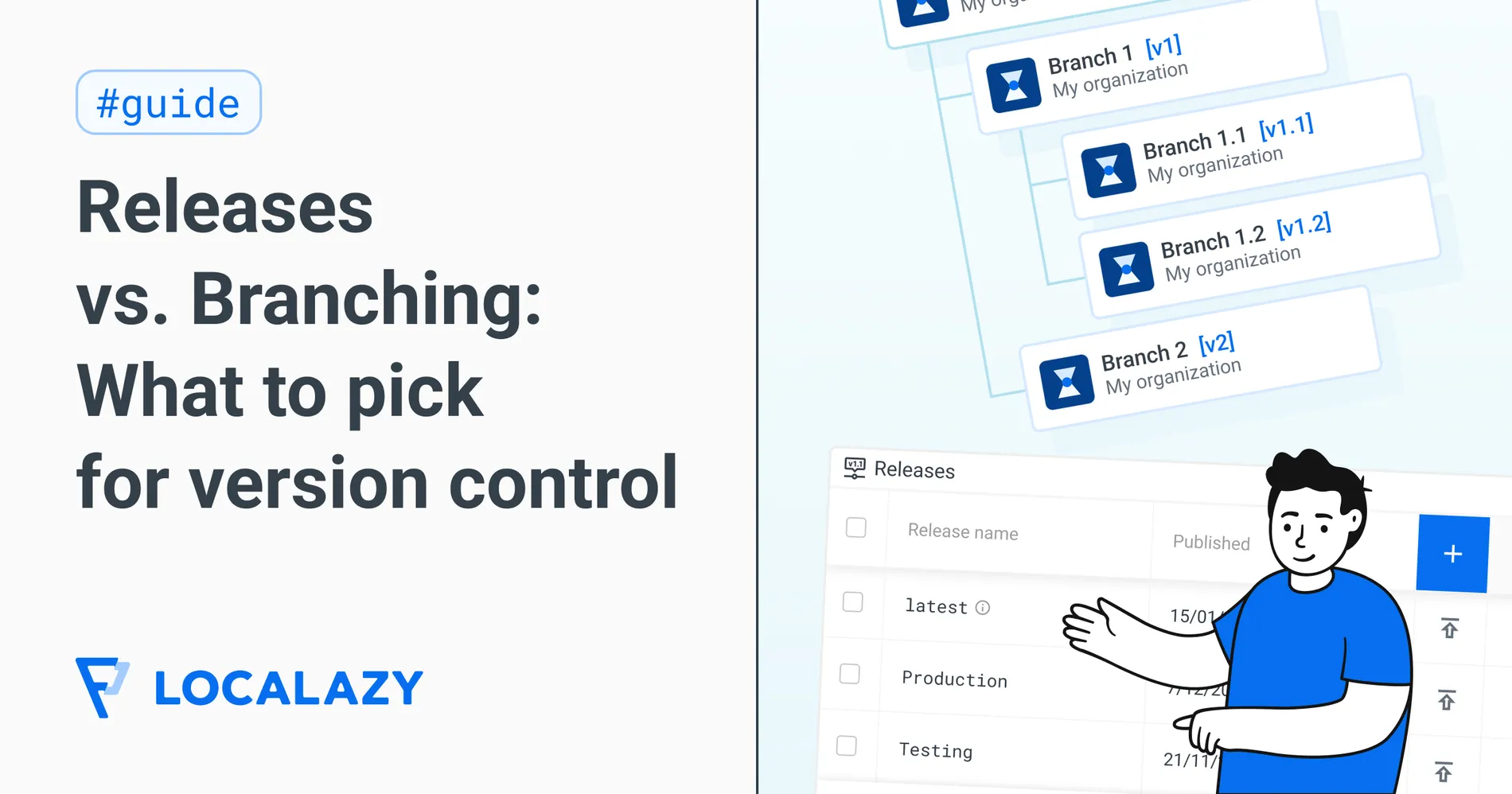
You can find Releases under Tools > Releases in your Localazy project. Every project starts with one release called latest, which always reflects your current project state in real time.
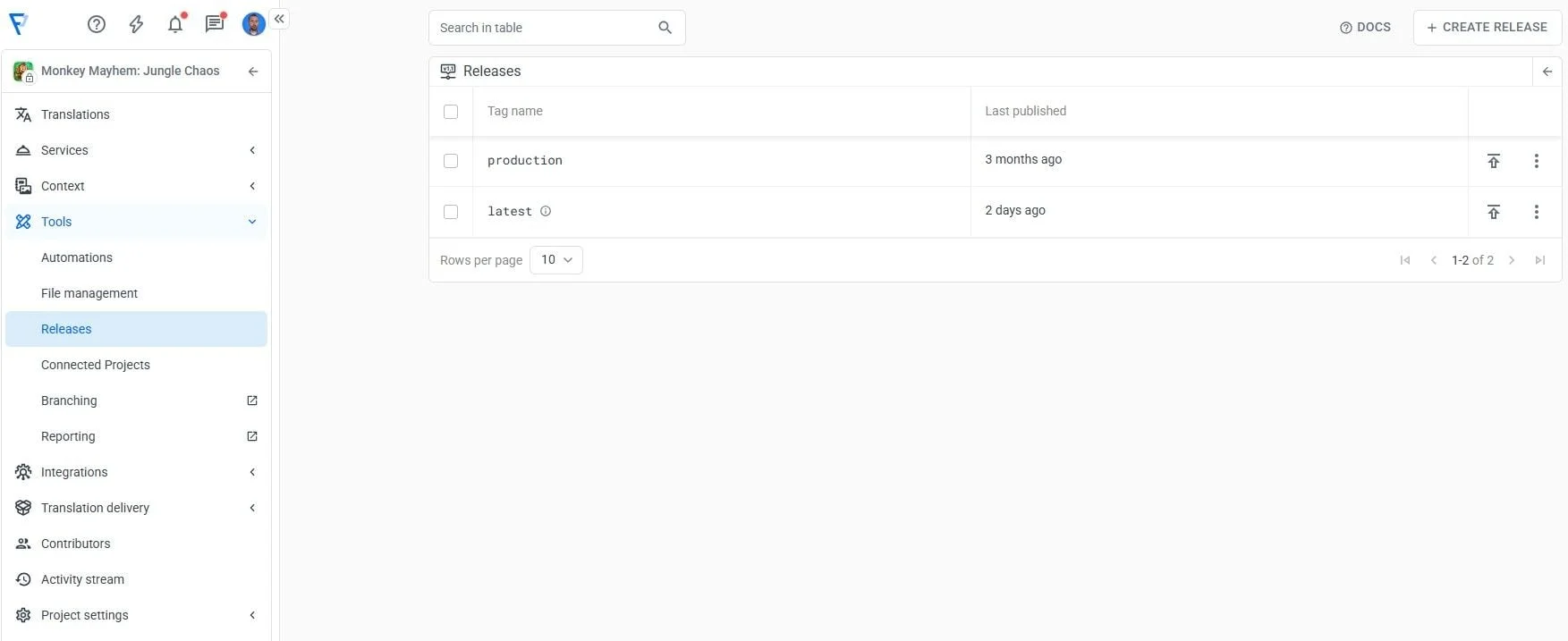
When you create a new release (let's say you name it production), Localazy takes a snapshot of all your translations at that moment. From that point on, production is frozen. No matter how many new strings you add, how many translations get edited, or how many AI suggestions you accept in the main project, production stays exactly as it was.
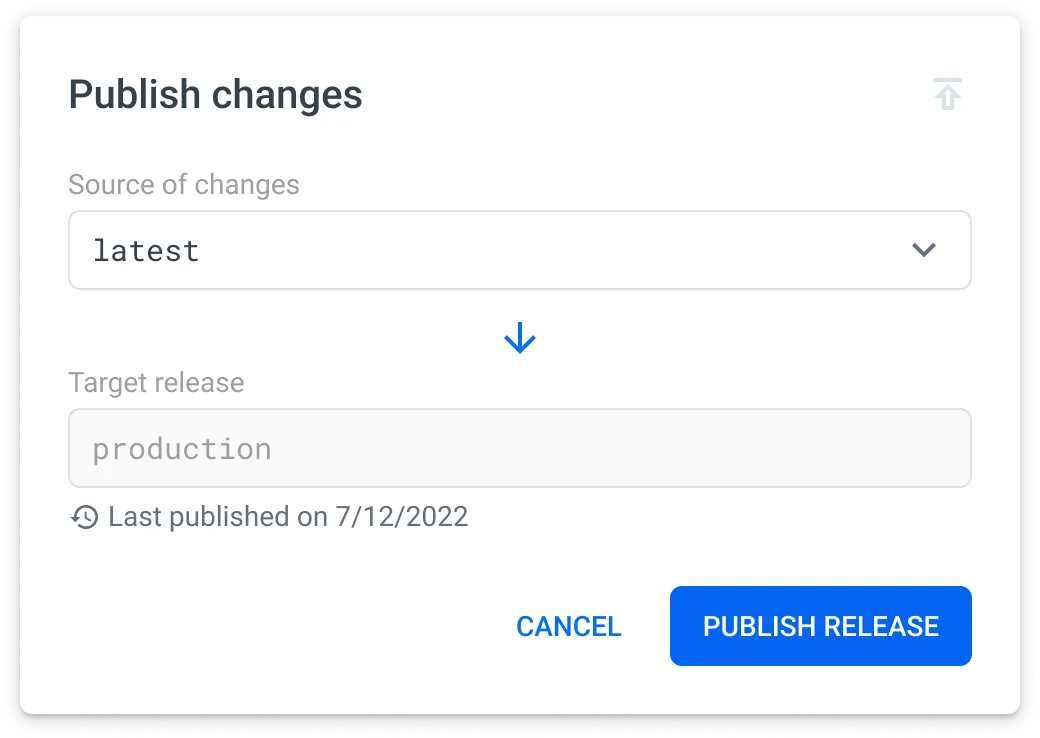
Your developers can point the CLI or CDN to production and know it won't change. When you're ready to push a new set of translations to users, you publish the current state into production, effectively replacing the old snapshot with a new one.
Setup example 🔗
A typical setup looks like this:
latest— the live working state, always up to datestaging— the version QA is currently testingproduction— what users are actually seeing
When QA signs off on staging, you promote it to production. Then translations flow forward deliberately.
When are Releases the right choice? 🔗
When:
- You want to make sure ongoing changes in Localazy don't touch what's in production.
- Your team is working on a SaaS product where everyone uses the same version.
- You want a simple, easy-to-explain setup that doesn't require much overhead.
- You don't anticipate needing to edit older translation states directly.
It's specifically a snapshot of translation content. Other features, like contributor settings, automations, glossaries... aren't part of a release. And you can't "revert" your project back to a release through the UI. If you needed to do that, you'd have to download the release via CLI and re-upload it manually.
For most teams, that's perfectly fine because the goal of releases is controlled delivery, not rollback.
🌿 Branching: When you need to edit a frozen version 🔗
Imagine you've just created a production release and everything looks great. Then a translator catches a typo or a mistranslation in a string that's live right now, and you need to fix it.
The problem is you also have half a dozen other strings in progress in your main project with new features, unreviewed AI suggestions, strings that aren't ready for users yet... You can't just publish everything. but this one fix needs to go out.
That’s where releases hit their limit, as they are read-only snapshots. You can't reach in and change a single string without updating the whole release to the current project state. And this is where Branching comes in.
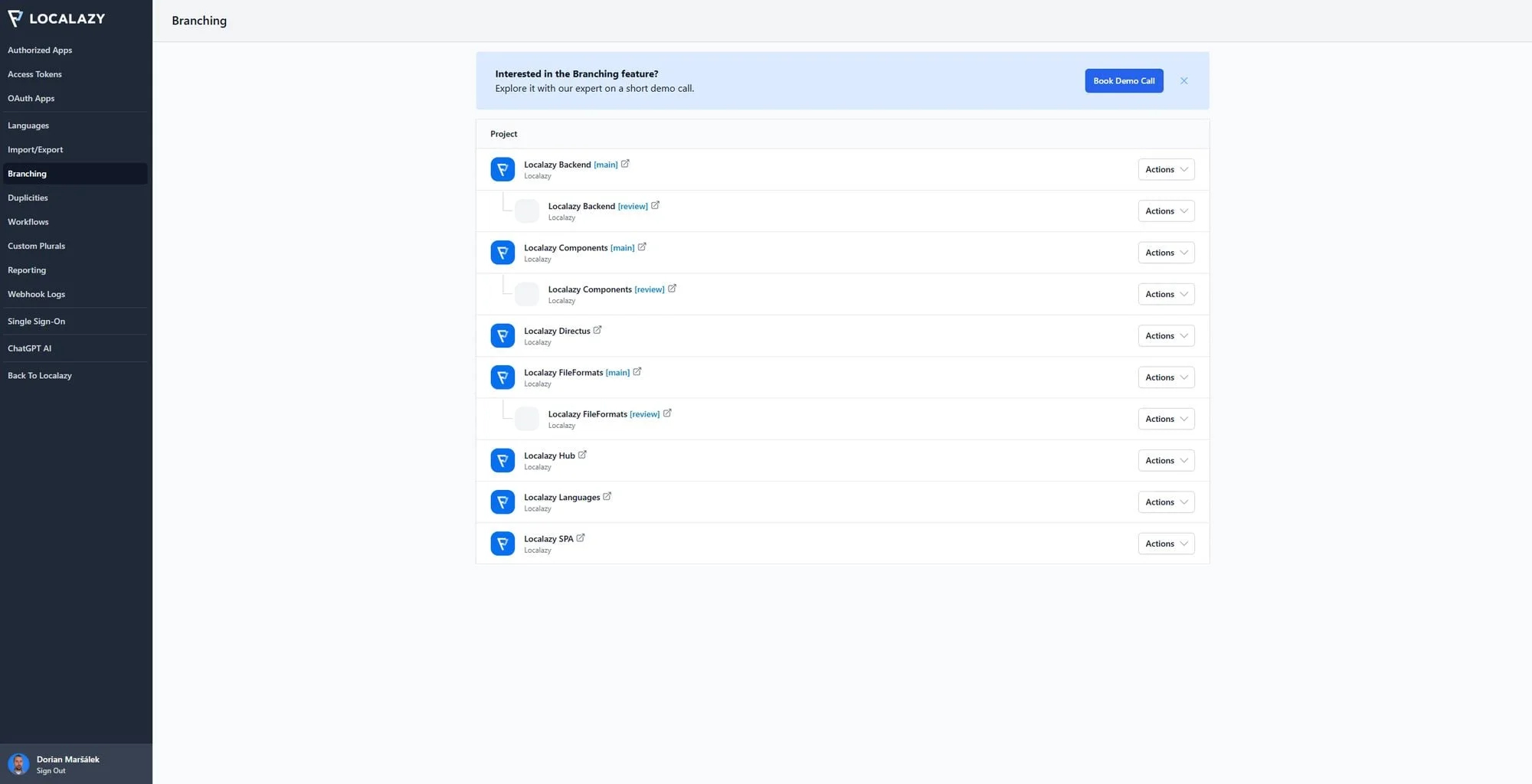
When you create a branch, Localazy creates what looks like a separate project (with its own interface, its own translations, its own access keys...). Your production branch becomes the place where the current user-facing translations are hosted and can be edited independently, without being affected by anything happening in the main branch.
So when you spot a typo, all you need to do is open the production branch, fix it, and it goes out. The fifty other strings being worked on in the main branch won't move. So if you're managing parallel workstreams, the ideal solution is going for Branches.
Some of our users maintain multiple long-lived versions of their product with this feature. For example: if they're preparing a v7.7 release and a v7.8 release simultaneously, or have an enterprise product where certain customers are still on an older version, it helps them keep consistency.
Setup example 🔗
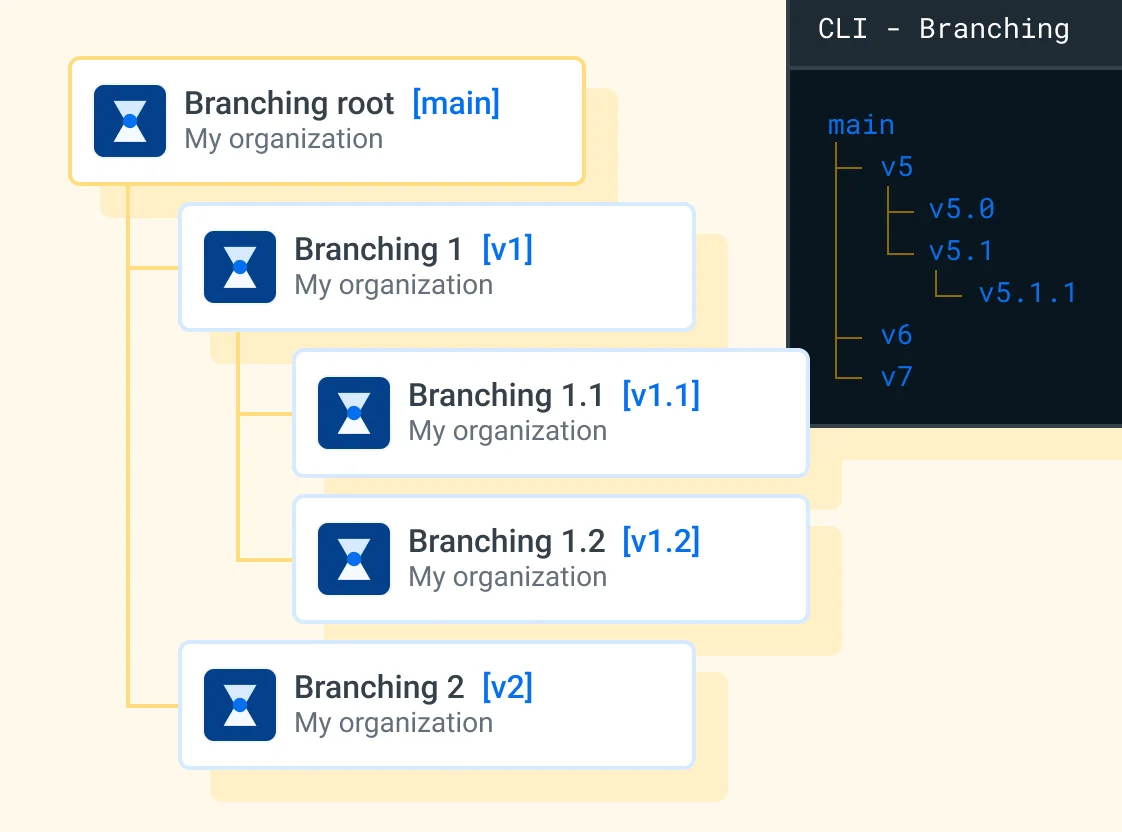
A nested branch setup Main > Staging > Production gives you the same controlled promotion flow as releases, but with the added ability to hotfix any layer independently.
When is Branching the right choice? 🔗
When:
- You need to fix translations in a deployed version without touching ongoing work.
- You're managing multiple long-lived versions of your product in parallel.
- You want translators to work on a specific feature or version in isolation before it merges to main.
- Your team uses feature branches in Git and you want the translation workflow to mirror that.
A few practical tips 🔗
- When you create a branch, Localazy copies your current project settings (contributors, Automations, Style guide, Glossary) into the new branch. After that, those settings are independent.
- If you add a contributor to the main branch later, they won't automatically appear in the branch.
- Only translations can be merged between branches.
- Branching is currently managed through Localazy's console interface and CLI, which actually gives you more control for branch operations, including merging and conflict resolution.
Ways to resolve conflicts 🔗
When you merge a branch back into its parent, Localazy compares the translations on both sides. If the same string was edited differently in each branch (for example, you fixed a typo in the production branch while someone updated the same string in the main branch) you have a conflict.
You can handle this in several ways:
- 🔧 Manual resolution: Review each conflict individually and choose which version wins.
- 🕢 Time-based resolution: The most recent edited version of a string wins automatically regardless of the branch it comes from.
- 🔄 Reference-based resolution: If the parent branch hasn't changed a string since the branch was created, the incoming change wins automatically. If both sides changed it, you resolve manually. In the Main > Staging > Production flow, conflicts are usually rare. If you're only making targeted hotfixes in the production branch, and merging clean feature work from main into staging, you'll rarely run into situations where the same string changed in both places.
👉 How to decide between both 🔗
Ultimately, Releases and Branching solve the same core problem: keeping your production translations stable, but for different levels of complexity. Most commonly, that means separating a production branch from everything still in progress.
If you're still unsure which one you need, here's a quick way to choose:
- Releases are easier to set up, and they're enough for most teams. Use them if you just need to make sure nothing in-progress leaks into what users see, and you're comfortable knowing that fixing a live translation means pushing everything through your normal review process first.
- Branching adds the ability to edit any version independently, which matters a lot once you're managing multiple deployed states or need to hotfix without a full release cycle. Use this feature if:
- you need the ability to make targeted edits to a deployed version independently,
- you're managing long-living, parallel versions of your product,
- you have a white-labeled build where each customer gets their own branch, or
- you want tighter control over what gets merged and when.
When in doubt, start with Releases. You can always move to Branching when you hit the wall that they can't get past. Neither one is the "advanced" version of the other: they're different tools for different situations. If you have specific questions, drop us a line — we'll be happy to help.
?FAQ 🔗
Do branches count against my source key limit in Localazy? 🔗
Yes: the keys you add or change in a branch count toward your organization's source key limit.
But a branch key count starts at zero when you create it, whether it's a full copy of your project or an empty branch. Only modified keys count from there on, when keys inside that specific branch are added or changed. If your account shows something different, contact the Localazy team directly.
Can I manage Releases and Branching from the CLI or automate them in CI/CD? 🔗
Yes. Both features are fully scriptable through the Localazy CLI (not the API). Releases are managed via localazy tag and Branching via localazy branch. Some common commands are:
- Publish a release:
localazy tag publish <name> - Pull a release:
localazy download -t <name> - Move a tested release forward:
localazy tag promote staging production - Create a branch:
localazy branch create <source_branch> <target_branch> - Merge a branch:
localazy branch merge <source_branch> <target_branch>
You can run any of these as part of a GitHub Actions, GitLab, or other CI/CD pipeline, without touching the web console. This is how most engineering teams that mirror a Git-based workflow run it.
Do I need a Localazy branch for every Git branch? 🔗
No. Most teams only need Localazy branches for long-lived versions or environment isolation, such as main, staging, and production. Mirroring your entire Git branch structure in Localazy usually adds overhead without adding real value.
Can I revert my project to a previous release, or restore a deleted branch? 🔗
A Release can't be "reverted" through the UI. You'd need to download it via CLI and re-upload it manually. Deleting a Branch is meant to be permanent: there's no built-in undo. If you delete one by accident, contact Localazy support to see what we can do.
Can I set up conflict resolution so the most recent change always wins? 🔗
Yes. Localazy supports time-based resolution: whichever version of a string was edited most recently wins automatically, no matter which branch it came from. A bidirectional option is also available, so the newer change can update either side. In the CLI, this maps to the --time and --time-bidi merge strategies (see CLI: Branching).
Is Branching available on every plan? 🔗
No. Branching is a Business plan feature, while Releases become available starting on the Professional plan. If you only need Branching occasionally, get in touch with us for alternatives.